
Getting Started: A Detailed Guide
Source:vignettes/articles/getting-started.Rmd
getting-started.RmdWhat is irtQ?
irtQ is an R package for unidimensional Item
Response Theory (IRT) analyses. It supports mixed-format tests
containing both dichotomous and polytomous items, and provides a unified
interface for the most common psychometric tasks in educational and
psychological measurement. For a short overview of the package, see Introduction to irtQ, also available in R as
vignette("irtQ", package = "irtQ").
Why IRT? A Brief Motivation
Before using irtQ, it helps to understand why IRT is preferred over Classical Test Theory (CTT) for many measurement tasks.
Classical Test Theory (CTT) summarizes examinees by their total (or proportion) correct score and items by their observed difficulty (p-value) and point-biserial correlation. While straightforward, CTT has well-known limitations:
- Sample dependence: item statistics (difficulty, discrimination) change with the examinee group, and person scores change with the item set
- No item-level probability model: CTT does not tell us the probability that a specific person answers a specific item correctly
- Limited equating: comparing scores across different test forms requires strong assumptions
Item Response Theory (IRT) addresses these limitations by modeling the probability of each response as a function of a latent trait (ability, proficiency, or attitude) and item parameters. Key advantages are:
- Invariance: item parameters do not depend on the ability distribution of the calibration sample; person parameters do not depend on which particular items were administered
- Item-level modeling: each item has its own characteristic curve describing how response probability changes with
- Common scale: items and persons are placed on the same continuum, enabling equating, adaptive testing, and longitudinal measurement
Core Capabilities of irtQ
irtQ covers the full IRT workflow:
Primary functions:
- Estimating item parameters: fixed-form calibration, pretest
calibration using Fixed Item Parameter Calibration (FIPC) and Fixed
Ability Parameter Calibration (FAPC) approaches, and multiple-group
calibration (
est_irt(),est_mg(),est_item()) - Estimating examinee abilities: maximum likelihood (ML), maximum
likelihood with fences (MLF), weighted likelihood (WL), maximum a
posteriori (MAP), expected a posteriori (EAP), EAP summed scoring, and
inverse test characteristic curve (TCC) scoring
(
est_score()) - Evaluating item-level model-data fit:
,
,
infit/outfit,
-
(
irtfit(),sx2_fit()) - Detecting differential item functioning (DIF): residual-based DIF
(RDIF), generalized residual-based DIF (GRDIF), and simultaneous item
bias test modified for CAT (CATSIB) (
rdif(),grdif(),catsib()) - Detecting item parameter drift (IPD): residual-based IPD (RIPD) and
the pseudo-count
statistic (
ripd(),pcd2()) - Computing classification accuracy and consistency indices
(
cac_lee(),cac_rud()) - Evaluating and simulating multistage-adaptive test (MST) panels:
panel structure, routing cut scores, recursion-based evaluation, and
simulation (
panel_info(),find_cut(),reval_mst(),run_mst())
Beyond these IRT-based analyses, irtQ also provides
a small set of classical test theory (CTT) functions (item difficulty,
item-total correlation, Cronbach’s alpha, option/distractor response
distributions, and total-score frequency distributions) for scoring and
analyzing selected-response item data without fitting an IRT model
(ctt(), freq_score(),
ctt_distr(), score_resp()).
Utilities:
| Function | Purpose |
|---|---|
simdat() |
Simulate IRT item response data |
info() |
Item and test information functions |
traceline() |
Item and test characteristic curves |
lwrc() |
Lord-Wingersky recursion (summed-score distributions) |
gen.weight() |
Generate quadrature weights from a distribution |
covirt() |
Asymptotic variance-covariance matrices of item parameter estimates |
write.flexmirt() |
Write item metadata to a flexMIRT parameter file |
run_flexmirt() |
Run flexMIRT from R (Windows only) |
score_resp() |
Score raw selected-response data into a 0/1 matrix |
This article introduces the IRT models supported by irtQ and the item metadata data structure that connects all functions. At the end, a minimal end-to-end workflow ties everything together.
Installation
Install the released version from CRAN:
install.packages("irtQ")Install the development version from GitHub:
# install.packages("devtools")
devtools::install_github("hwangQ/irtQ")
Load the package:
Supported IRT Models
irtQ supports the following unidimensional IRT models for dichotomous and polytomous items.
Dichotomous Models: 1PLM, 2PLM, and 3PLM
For a binary response from an examinee with latent ability , the probability of a correct response () under the three-parameter logistic model (3PLM) is:
The four quantities in this equation each have a concrete interpretation:
:
Latent ability (person parameter)
The unobserved trait being measured. The
scale is typically standardized so that
in the reference population:
is average ability,
is one standard deviation above average, and so on.
:
Discrimination (item parameter)
Controls how steeply the item characteristic curve (ICC) rises. A highly
discriminating item (large
)
sharply separates examinees just below and just above the item’s
difficulty; a weakly discriminating item (small
)
produces a nearly flat ICC and provides little information about
.
In practice,
typically ranges from about 0.5 to 2.5.
:
Difficulty (item parameter)
The point on the
scale where the probability of a correct response is halfway between
and 1,
i.e. .
For the 2PLM (where
),
this simplifies to the
value where
.
Items with
are easy (most examinees answer correctly); items with
are hard. Values typically range from about
to
.
:
Pseudo-guessing (item parameter)
The lower asymptote of the ICC: the probability of a correct response as
.
For a 5-option multiple-choice item with pure random guessing,
.
When
,
the lower asymptote is 0 and the model reduces to the 2PLM (or the
1PLM).
:
Scaling constant
is a constant that makes the logistic function closely approximate the
normal ogive used in the original IRT formulation. Using
is conventional when working with logistic models; set
to work on the purely logistic scale. irtQ functions that take
D use D = 1 by default; set
D = 1.702 explicitly to approximate the normal-ogive
metric.
Special cases: 1PLM and 2PLM
| Model | Discrimination | Guessing | Free parameters |
|---|---|---|---|
| 1PLM | Fixed to 1 or constrained equal across items | only | |
| 2PLM | Freely estimated, varies across items | , | |
| 3PLM | Freely estimated, varies across items | Freely estimated | , , |
Note on 1PLM in irtQ. When
fix.a.1pl = TRUE(inest_irt()), the discrimination is fixed to the valuea.val.1pl(default 1). The latent variance is also fixed (at 1 by default), so this is a 1PLM with a fixed common slope rather than the usual Rasch identification, in which the slope is fixed and the latent variance is estimated. Whenfix.a.1pl = FALSE(the default), the common discrimination is estimated from the data but constrained to be equal across all 1PLM items. Both specifications produce only as the item-differentiating parameter, but the second is more flexible when a common slope of does not exactly hold.
Polytomous Models: GRM and GPCM
For items with ordered response categories scored (e.g., a 4-point rating scale scored 0-3), irtQ supports two models.
Graded Response Model (GRM)
The GRM (Samejima, 1969) models cumulative boundary response functions, one for each adjacent pair of categories. The cumulative probability of responding in category or higher is:
with the conventions and .
The probability of responding in exactly category is then:
Parameters:
- : a single discrimination parameter shared across all category boundaries
- : ordered threshold parameters, where is the value at which the probability of responding above category equals 0.5. The ordering constraint ensures that the response probabilities are non-negative for all .
Intuition: Think of the GRM as applying a 2PLM-like curve to each of the adjacent-category boundaries. marks the easy end of the scale (where most examinees move from category 0 to category 1), and marks the hard end (where examinees move into the top category).
Example (4-category GRM item, ):
- : Examinees with have a 50% chance of scoring 1 or higher
- : Examinees with have a 50% chance of scoring 2 or higher
- : Examinees with have a 50% chance of scoring 3 (the top category)
Generalized Partial Credit Model (GPCM)
The GPCM (Muraki, 1992) generalizes the Partial Credit Model [PCM; Masters (1982)] by allowing items to have different discrimination parameters. The probability of responding in category is:
where the term is defined as 0 ( is not a free parameter), so the numerator for is .
Parameters:
- : a single discrimination parameter for the item
- : step parameters (also called threshold parameters), where governs the transition from category to category . Unlike GRM thresholds, GPCM step parameters need not be ordered.
Relationship to other models:
- Setting for all items gives the Partial Credit Model (PCM) (Masters, 1982)
- The GPCM is therefore a generalization of the PCM that allows item-varying discrimination
- In irtQ, a PCM item is specified as
model = "GPCM"withfix.a.gpcm = TRUE(a.val.gpcm = 1) in the estimation functions; withD = 1and the latent variance fixed at 1 (the default), this is the PCM. There is no separate"PCM"model string.
How to specify in irtQ: For an item with
categories, provide a vector of
step parameters as the d argument in
shape_df(). The
term is handled internally; you do not supply
.
Summary: All Supported Models
| Model | Item type | Parameters | Notes |
|---|---|---|---|
| 1PLM | Dichotomous | fixed or equal-constrained; | |
| 2PLM | Dichotomous | ||
| 3PLM | Dichotomous | All three parameters free | |
| GRM | Polytomous | Thresholds must be ordered | |
| GPCM | Polytomous | Step params need not be ordered | |
| PCM | Polytomous | GPCM with
;
use "GPCM" with fix.a.gpcm = TRUE
|
Alias:
"DRM"is accepted as a model string for any dichotomous item (1PLM, 2PLM, or 3PLM) in contexts where the model is already encoded in the metadata.
est_irt()fits items labeled"DRM"as 3PLM items (with a warning), so change the label (e.g., to"2PLM") before calibrating imported"DRM"items if the guessing parameter should not be estimated.
Item Metadata: The Central Data Structure
Nearly every irtQ function accepts a data frame
x as its first argument. This item
metadata frame is a standardized, row-per-item table that
encodes the IRT model and parameter values for each item in a test form.
It serves as the single input format shared across all analyses
(calibration, scoring, fit evaluation, DIF detection, and more), so you
only need to build it once.
Column Structure
| Column | Type | Description |
|---|---|---|
id |
character | Unique item identifier |
cats |
integer | Number of response categories (2 for dichotomous) |
model |
character | IRT model: "1PLM", "2PLM",
"3PLM", "GRM", "GPCM"
|
par.1 |
numeric | Discrimination parameter () |
par.2 |
numeric | Difficulty () for dichotomous; first threshold () for polytomous |
par.3 |
numeric | Guessing
()
for 3PLM; second threshold
()
for polytomous; NA otherwise |
par.4, … |
numeric | Additional thresholds for polytomous items; NA for
dichotomous |
The number of par.* columns grows with the maximum
number of categories across items. For example, a test containing a GRM
item with 5 categories will have columns par.1 through
par.5, with NA filling unused slots for
dichotomous items.
A Concrete Example
# 3 dichotomous items (2PLM) + 2 polytomous items (GRM, 4 categories)
meta_demo <- shape_df(
  par.drm = list(
    a = c(1.2, 0.9, 1.5),
    b = c(-0.5, 0.0, 1.0),
    g = c(NA, NA, NA)         # NA: no guessing for 2PLM
  ),
  par.prm = list(
    a = c(1.8, 1.3),
    d = list(
      c(-1.2, 0.0, 1.2),      # 3 thresholds for item 4 (4 categories)
      c(-0.8, 0.3, 1.5)       # 3 thresholds for item 5 (4 categories)
    )
  ),
  item.id = paste0("I", 1:5),
  cats    = c(2, 2, 2, 4, 4),
  model   = c("2PLM", "2PLM", "2PLM", "GRM", "GRM")
)
meta_demo
#>   id cats model par.1 par.2 par.3 par.4
#> 1 I1    2  2PLM   1.2  -0.5    NA    NA
#> 2 I2    2  2PLM   0.9   0.0    NA    NA
#> 3 I3    2  2PLM   1.5   1.0    NA    NA
#> 4 I4    4   GRM   1.8  -1.2   0.0   1.2
#> 5 I5    4   GRM   1.3  -0.8   0.3   1.5
Reading across the columns:
- Items I1-I3 are 2PLM:
par.1= ,par.2= ,par.3=NA(no guessing),par.4=NA(no third threshold) - Items I4-I5 are GRM with 4 categories:
par.1= ,par.2-par.4=
Creating Item Metadata with shape_df()
shape_df() is the primary tool for building item
metadata from scratch. It takes parameter values as named lists and
returns a correctly formatted metadata data frame.
Example 1: Six dichotomous items (1PLM, 2PLM, 3PLM mixed)
meta_ex1 <- shape_df(
  par.drm = list(
    a = c(1.0, 1.0, 0.9, 1.2, 0.8, 2.1),     # discrimination
    b = c(0.2, 2.3, -0.4, -2.5, 0.9, 1.2),   # difficulty
    g = c(NA,  NA,   NA,   NA,  0.2, 0.1)     # guessing: NA for 1PLM/2PLM
  ),
  item.id = paste0("ITEM", 1:6),
  cats  = 2,
  model = c("1PLM", "1PLM", "2PLM", "2PLM", "3PLM", "3PLM")
)
meta_ex1
#>      id cats model par.1 par.2 par.3
#> 1 ITEM1    2  1PLM   1.0   0.2    NA
#> 2 ITEM2    2  1PLM   1.0   2.3    NA
#> 3 ITEM3    2  2PLM   0.9  -0.4    NA
#> 4 ITEM4    2  2PLM   1.2  -2.5    NA
#> 5 ITEM5    2  3PLM   0.8   0.9   0.2
#> 6 ITEM6    2  3PLM   2.1   1.2   0.1
Key points:
-
par.drmtakes a named list with three vectors:a(discrimination),b(difficulty), andg(guessing). Setg = NAfor 1PLM and 2PLM items. - Items 1 and 2 are 1PLM: their
avalues are provided inpar.drmbut will be handled according to thefix.a.1plargument in estimation functions. Thepar.3column in the output isNAbecause there is no guessing for 1PLM items. - Items 5 and 6 are 3PLM: their guessing parameters are
0.2and0.1respectively.
Example 2: Mixed-format test (dichotomous + polytomous)
meta_ex2 <- shape_df(
  par.drm = list(
    a = c(0.8, 2.1),
    b = c(0.9, 1.2),
    g = c(0.2, 0.1)
  ),
  par.prm = list(
    a = c(1.9, 1.3, 0.7),
    d = list(
      c(-1.20, -0.52,  0.25),       # GRM  item: 4 categories -> 3 thresholds
      c(-2.20, -1.50, -0.55),       # GPCM item: 4 categories -> 3 step params
      c(-0.92, -0.43,  0.49, 1.11)  # GPCM item: 5 categories -> 4 step params
    )
  ),
  item.id = paste0("ITEM", 1:5),
  cats  = c(2, 2, 4, 4, 5),
  model = c("3PLM", "3PLM", "GRM", "GPCM", "GPCM")
)
meta_ex2
#>      id cats model par.1 par.2 par.3 par.4 par.5
#> 1 ITEM1    2  3PLM   0.8  0.90  0.20    NA    NA
#> 2 ITEM2    2  3PLM   2.1  1.20  0.10    NA    NA
#> 3 ITEM3    4   GRM   1.9 -1.20 -0.52  0.25    NA
#> 4 ITEM4    4  GPCM   1.3 -2.20 -1.50 -0.55    NA
#> 5 ITEM5    5  GPCM   0.7 -0.92 -0.43  0.49  1.11
Key points:
-
par.prmtakes a named list witha(discrimination for polytomous items) andd(a list of threshold/step parameter vectors, one per polytomous item). - Each vector in
dmust have length where iscatsfor that item: 4-category items need 3 values; 5-category items need 4 values. - For a GRM item, the values in
dare thresholds , which must be in increasing order. - For a GPCM item, the values in
dare step parameters , which need not be ordered. - The
dvectors for GRM and GPCM items can be mixed within the samepar.prmlist; themodelargument determines which model applies to each item.
Example 3: Uniform model, auto-assigned IDs
When all items share the same model, a single model string is
recycled. If item.id is omitted, IDs are auto-assigned as
V1, V2, …
meta_ex3 <- shape_df(
  par.drm = list(
    a = c(1.0, 1.0, 0.9, 1.2, 0.8, 2.1),
    b = c(0.2, 2.3, -0.4, -2.5, 0.9, 1.2),
    g = c(0.1, 0.3, 0.1, 0.2, 0.2, 0.1)
  ),
  cats  = 2,
  model = "3PLM"   # recycled for all six items
)
meta_ex3
#>   id cats model par.1 par.2 par.3
#> 1 V1    2  3PLM   1.0   0.2   0.1
#> 2 V2    2  3PLM   1.0   2.3   0.3
#> 3 V3    2  3PLM   0.9  -0.4   0.1
#> 4 V4    2  3PLM   1.2  -2.5   0.2
#> 5 V5    2  3PLM   0.8   0.9   0.2
#> 6 V6    2  3PLM   2.1   1.2   0.1
Example 4: Default parameters (default.par = TRUE)
Set default.par = TRUE to create a metadata frame with
placeholder parameters without specifying values explicitly. This is
useful when you want to calibrate items from scratch and only need the
structure, or as a starting point for editing. Default values are
,
,
for 3PLM and NA for 1PLM/2PLM; polytomous thresholds
default to all zeros.
shape_df() Argument Summary
| Argument | Description |
|---|---|
par.drm |
Named list with a, b, g
vectors for dichotomous items |
par.prm |
Named list with a and d (list of threshold
vectors) for polytomous items |
item.id |
Character vector of item IDs; auto-assigned as V1,
V2, … if omitted |
cats |
Integer vector of category counts per item (scalar if all equal) |
model |
Character vector of model strings (scalar if all equal) |
default.par |
If TRUE, fill parameters with built-in defaults
(default FALSE) |
Importing Item Metadata from External IRT Software
The bring.*() family of functions converts output files
from external IRT programs into irtQ’s item metadata
format. This makes it easy to use parameters calibrated in another
program as the starting point for downstream irtQ
analyses.
For an item parameter file (type = "par") and for
bring.mirt(), the $full_df component of the
result is the item metadata data frame; bring.flexmirt()
returns one such list per group. bring.flexmirt() labels
dichotomous items "3PLM" or "2PLM", while
bring.bilog(), bring.parscale(), and
bring.mirt() label them "DRM". The output does
not record the scaling constant, so pass the value of D
used in the original calibration (e.g., 1 for flexMIRT and
mirt) to the other irtQ functions.
Importing from flexMIRT
# Locate the sample flexMIRT -prm.txt file bundled with irtQ
flex_file <- system.file("extdata", "flexmirt_sample-prm.txt", package = "irtQ")

# Import: returns a list keyed by group (e.g., Group1, Group2, ...)
meta_flex <- bring.flexmirt(file = flex_file, type = "par")$Group1$full_df
meta_flex
#>       id cats model     par.1       par.2        par.3      par.4      par.5
#> 1   CMC1    2  3PLM 0.7627842  1.46195307  0.261505353         NA         NA
#> 2   CMC2    2  3PLM 1.9212842 -1.04997761  0.175294361         NA         NA
#> 3   CMC3    2  3PLM 0.9266599  0.39475508  0.099746565         NA         NA
#> 4   CMC4    2  3PLM 1.0526419 -0.40704222  0.201193373         NA         NA
#> 5   CMC5    2  3PLM 0.8663350 -0.12481696  0.160420403         NA         NA
#> 6   CMC6    2  3PLM 1.6956204  0.62610659  0.072168572         NA         NA
#> 7   CMC7    2  3PLM 0.9061455  1.01573864  0.119458135         NA         NA
#> 8   CMC8    2  3PLM 0.8442812  0.80047702  0.114479251         NA         NA
#> 9   CMC9    2  3PLM 0.8541021  0.85236906  0.255248657         NA         NA
#> 10 CMC10    2  3PLM 1.5320152  0.09036640  0.135385451         NA         NA
#> 11 CMC11    2  3PLM 1.0018535 -0.46145320  0.132401405         NA         NA
#> 12 CMC12    2  3PLM 0.8784359  1.18144944  0.087687982         NA         NA
#> 13 CMC13    2  3PLM 1.4566944  1.40553715  0.181275480         NA         NA
#> 14 CMC14    2  3PLM 1.5142828  0.18435004  0.248064790         NA         NA
#> 15 CMC15    2  3PLM 1.2965707 -0.22914423  0.111920040         NA         NA
#> 16 CMC16    2  3PLM 2.0469491 -0.08536470  0.050890225         NA         NA
#> 17 CMC17    2  3PLM 1.3978190 -0.13421645  0.178526460         NA         NA
#> 18 CMC18    2  3PLM 1.6957073  1.24709400  0.273106846         NA         NA
#> 19 CMC19    2  3PLM 2.3117795 -1.01102523  0.179638721         NA         NA
#> 20 CMC20    2  3PLM 1.4489340 -1.65436976  0.190693574         NA         NA
#> 21 CMC21    2  3PLM 1.6281382 -1.19437963  0.121929251         NA         NA
#> 22 CMC22    2  3PLM 0.8320715 -0.67723050  0.197432042         NA         NA
#> 23 CMC23    2  3PLM 0.9768588 -0.25632988  0.130014303         NA         NA
#> 24 CMC24    2  3PLM 1.1418671  1.67963811  0.254011205         NA         NA
#> 25 CMC25    2  3PLM 0.7944843 -1.39426607  0.264555718         NA         NA
#> 26 CMC26    2  3PLM 1.0923706 -1.84806805  0.166491117         NA         NA
#> 27 CMC27    2  3PLM 1.1730201  0.07444365  0.131922668         NA         NA
#> 28 CMC28    2  3PLM 2.1546851 -0.08787145  0.208148649         NA         NA
#> 29 CMC29    2  3PLM 1.2810740 -1.38040199  0.201295671         NA         NA
#> 30 CMC30    2  3PLM 1.3505976  0.82351324  0.323145357         NA         NA
#> 31 CMC31    2  3PLM 0.8203985  0.70908638  0.082856907         NA         NA
#> 32 CMC32    2  3PLM 1.5235060 -0.88999000  0.257420730         NA         NA
#> 33 CMC33    2  3PLM 1.2711786 -1.31320312  0.186172388         NA         NA
#> 34 CMC34    2  3PLM 1.3107828  0.18690381  0.158109796         NA         NA
#> 35 CMC35    2  3PLM 1.4665995 -0.13801287  0.226328899         NA         NA
#> 36 CMC36    2  3PLM 0.8918806  1.09548554  0.126283949         NA         NA
#> 37 CMC37    2  3PLM 1.7287653 -0.40939097  0.104544594         NA         NA
#> 38 CMC38    2  3PLM 0.7327085 -0.37360246  0.218883035         NA         NA
#> 39  CFR1    5   GRM 1.9134815 -1.86983653 -1.238979525 -0.7140496 -0.2301269
#> 40  CFR2    5   GRM 1.2784658 -0.72406919 -0.068767894  0.5689640  1.0726913
#> 41  AMC1    2  3PLM 1.4655489  0.64088029  0.225388960         NA         NA
#> 42  AMC2    2  3PLM 1.7609502 -1.52832130  0.158898368         NA         NA
#> 43  AMC3    2  3PLM 1.4430127  0.54078083  0.138825943         NA         NA
#> 44  AMC4    2  3PLM 0.9784240 -0.36582964  0.126958991         NA         NA
#> 45  AMC5    2  3PLM 0.9915383  2.37079859  0.164822203         NA         NA
#> 46  AMC6    2  3PLM 2.2732723  1.62427761  0.178409401         NA         NA
#> 47  AMC7    2  3PLM 1.2256893 -0.07172021  0.131317231         NA         NA
#> 48  AMC8    2  3PLM 1.6399644  0.16526401  0.182665802         NA         NA
#> 49  AMC9    2  3PLM 1.2090633  0.23974948  0.081366545         NA         NA
#> 50 AMC10    2  3PLM 1.3201851  1.33993665  0.079323850         NA         NA
#> 51 AMC11    2  3PLM 1.7372043 -0.99805101  0.246773029         NA         NA
#> 52 AMC12    2  3PLM 0.9746876 -0.72824708  0.223540392         NA         NA
#> 53  AFR1    5   GRM 1.1378595 -0.37401164  0.215487852  0.8485578  1.3826066
#> 54  AFR2    5   GRM 1.2333756 -2.07872217 -1.347637330 -0.7054699 -0.1163185
#> 55  AFR3    5   GRM 0.8762246 -0.75520683 -0.005929073  0.6650100  1.2474287
bring.flexmirt() returns a nested list
keyed by group name. Use $Group1$full_df,
$Group2$full_df, etc. to access each group’s metadata.
Importing from PARSCALE
# Locate the sample PARSCALE .PAR file bundled with irtQ
pscale_file <- system.file("extdata", "parscale_sample.PAR", package = "irtQ")

# Import item parameters
meta_pscale <- bring.parscale(file = pscale_file, type = "par")$full_df
meta_pscale
#>      id cats model   par.1    par.2    par.3    par.4    par.5
#> 1  0001    2   DRM 0.78668  1.45392  0.26424       NA       NA
#> 2  0002    2   DRM 1.95256 -1.03590  0.16790       NA       NA
#> 3  0003    2   DRM 0.92423  0.36744  0.08911       NA       NA
#> 4  0004    2   DRM 1.06017 -0.41665  0.19257       NA       NA
#> 5  0005    2   DRM 0.86593 -0.15680  0.14700       NA       NA
#> 6  0006    2   DRM 1.70781  0.62067  0.06983       NA       NA
#> 7  0007    2   DRM 0.91006  0.99884  0.11532       NA       NA
#> 8  0008    2   DRM 0.84174  0.77277  0.10594       NA       NA
#> 9  0009    2   DRM 0.86645  0.84402  0.25407       NA       NA
#> 10 0010    2   DRM 1.54383  0.08762  0.13141       NA       NA
#> 11 0011    2   DRM 1.00673 -0.47776  0.12047       NA       NA
#> 12 0012    2   DRM 0.87475  1.15744  0.08077       NA       NA
#> 13 0013    2   DRM 1.48901  1.39467  0.18195       NA       NA
#> 14 0014    2   DRM 1.53152  0.18416  0.24621       NA       NA
#> 15 0015    2   DRM 1.30079 -0.24027  0.10225       NA       NA
#> 16 0016    2   DRM 2.06064 -0.08604  0.04616       NA       NA
#> 17 0017    2   DRM 1.41035 -0.13591  0.17396       NA       NA
#> 18 0018    2   DRM 1.73702  1.23955  0.27421       NA       NA
#> 19 0019    2   DRM 2.35588 -0.99336  0.17489       NA       NA
#> 20 0020    2   DRM 1.47074 -1.64613  0.17122       NA       NA
#> 21 0021    2   DRM 1.65023 -1.18579  0.10906       NA       NA
#> 22 0022    2   DRM 0.83234 -0.71780  0.17873       NA       NA
#> 23 0023    2   DRM 0.97745 -0.28252  0.11614       NA       NA
#> 24 0024    2   DRM 1.19351  1.66222  0.25751       NA       NA
#> 25 0025    2   DRM 0.80015 -1.42399  0.24565       NA       NA
#> 26 0026    2   DRM 1.10754 -1.84767  0.14416       NA       NA
#> 27 0027    2   DRM 1.17525  0.06034  0.12368       NA       NA
#> 28 0028    2   DRM 2.17855 -0.08451  0.20623       NA       NA
#> 29 0029    2   DRM 1.29244 -1.39057  0.17961       NA       NA
#> 30 0030    2   DRM 1.37376  0.82118  0.32351       NA       NA
#> 31 0031    2   DRM 0.81518  0.67339  0.07125       NA       NA
#> 32 0032    2   DRM 1.54708 -0.87791  0.25249       NA       NA
#> 33 0033    2   DRM 1.28305 -1.32022  0.16690       NA       NA
#> 34 0034    2   DRM 1.31798  0.17924  0.15299       NA       NA
#> 35 0035    2   DRM 1.48301 -0.13656  0.22323       NA       NA
#> 36 0036    2   DRM 0.89426  1.07673  0.12151       NA       NA
#> 37 0037    2   DRM 1.74214 -0.40933  0.09754       NA       NA
#> 38 0038    2   DRM 0.73472 -0.40711  0.20611       NA       NA
#> 39 0039    5   GRM 1.94931 -1.82855 -1.21040 -0.69548 -0.22021
#> 40 0040    5   GRM 1.30020 -0.70553 -0.06094  0.56671  1.06264
#> 41 0041    2   DRM 1.48353  0.63767  0.22449       NA       NA
#> 42 0042    2   DRM 1.79481 -1.50864  0.14541       NA       NA
#> 43 0043    2   DRM 1.45567  0.53570  0.13648       NA       NA
#> 44 0044    2   DRM 0.98254 -0.38343  0.11552       NA       NA
#> 45 0045    2   DRM 1.05231  2.31660  0.16867       NA       NA
#> 46 0046    2   DRM 2.41144  1.60547  0.18062       NA       NA
#> 47 0047    2   DRM 1.23217 -0.08089  0.12396       NA       NA
#> 48 0048    2   DRM 1.65413  0.16364  0.17983       NA       NA
#> 49 0049    2   DRM 1.21099  0.22634  0.07378       NA       NA
#> 50 0050    2   DRM 1.33178  1.32871  0.07789       NA       NA
#> 51 0051    2   DRM 1.76740 -0.98230  0.24200       NA       NA
#> 52 0052    2   DRM 0.97768 -0.75322  0.20821       NA       NA
#> 53 0053    5   GRM 1.15715 -0.36099  0.21902  0.84214  1.36791
#> 54 0054    5   GRM 1.25620 -2.03425 -1.31648 -0.68590 -0.10716
#> 55 0055    5   GRM 0.89213 -0.73461  0.00167  0.66112  1.23362
Importing from BILOG-MG
# Import from a BILOG-MG .PAR output file (not run; replace with your path)
meta_bilog <- bring.bilog(file = "output/mytest.PAR", type = "par")$full_df
Importing from the mirt package
bring.mirt() requires the suggested
mirt package. Dichotomous items, including two-category
items fitted with the "graded", "gpcm", or
"gpcmIRT" model in a mixed-format fit, are imported as
"DRM" items. A model fitted to multiple groups is not
supported; extract one group first with
mirt::extract.group().
# Fit a model with mirt (not run)
# mirt_mod <- mirt::mirt(data = my_data, model = 1, itemtype = "2PL")

# Convert to irtQ metadata
# meta_mirt <- bring.mirt(x = mirt_mod)$full_df
Common Arguments for bring.*() Functions
All bring.*() functions except bring.mirt()
share two main arguments:
| Argument | Description |
|---|---|
file |
Path to the external software output file |
type |
"par" (default) for item parameter estimates;
"sco" for ability score estimates |
bring.flexmirt() also has rePar,
rePar.gpc, and n.factor; keep the defaults
rePar = TRUE and rePar.gpc = TRUE to get irtQ
metadata.
In practice, replace system.file(...) with the actual
path to your file:
meta <- bring.flexmirt(file = "output/my_calibration-prm.txt",
                       type = "par")$Group1$full_df
Reading Item Metadata from a CSV File
You can also prepare item metadata in a spreadsheet and read it into R as a CSV file, as long as the column structure matches the irtQ specification.
# Read item metadata from a CSV file (not run; replace with your path)
meta_csv <- read.csv("my_item_parameters.csv", stringsAsFactors = FALSE)

# Verify the structure
str(meta_csv)
head(meta_csv)
Ensure that:
- Column names are exactly
id,cats,model,par.1,par.2,par.3, … -
idis character,catsis integer,modelis character,par.*are numeric - Missing threshold or guessing parameters are coded as
NA - GRM threshold columns (
par.2,par.3, …) are in increasing order within each row
A Complete End-to-End Workflow
This article has focused on item metadata, the central data structure that connects all irtQ functions. To show how metadata fits into the broader analysis pipeline, the example below walks through a minimal end-to-end workflow: define item metadata, simulate responses, estimate item parameters, estimate abilities, and check recovery. Each step beyond metadata creation is covered in depth in its own dedicated article (see What’s Next? at the end of this page).
set.seed(2026)

# ---- Step 1: Define item metadata (20-item mixed test) ----
# 15 dichotomous 2PLM items + 5 polytomous GRM items (4 categories)
meta_wf <- shape_df(
  par.drm = list(
    a = c(0.8, 1.2, 1.5, 0.9, 1.1, 1.3, 0.7, 1.0, 1.4, 0.85,
          1.1, 0.9, 1.2, 1.0, 1.3),
    b = c(-1.5, -1.0, -0.5, -0.2, 0.0, 0.2, 0.5, 0.8, 1.0, 1.5,
          -1.2, -0.8, -0.3, 0.1, 0.4),
    g = rep(NA, 15)
  ),
  par.prm = list(
    a = c(1.4, 1.1, 0.9, 1.2, 1.0),
    d = list(
      c(-1.5, -0.2,  0.9),
      c(-1.2,  0.1,  1.2),
      c(-0.9,  0.4,  1.5),
      c(-1.1, -0.1,  1.0),
      c(-1.3,  0.3,  1.3)
    )
  ),
  item.id = c(paste0("D", 1:15), paste0("P", 1:5)),
  cats    = c(rep(2, 15), rep(4, 5)),
  model   = c(rep("2PLM", 15), rep("GRM", 5))
)

# ---- Step 2: Simulate response data (500 examinees, N(0,1)) ----
theta_true <- rnorm(500, mean = 0, sd = 1)
resp <- simdat(x = meta_wf, theta = theta_true, D = 1.702)

cat("Response matrix dimensions:", dim(resp), "\n")  # 500 examinees x 20 items
#> Response matrix dimensions: 500 20
# ---- Step 3: Estimate item parameters with est_irt() ----
mod <- est_irt(
  data    = resp,
  D       = 1.702,
  model   = c(rep("2PLM", 15), rep("GRM", 5)),
  cats    = c(rep(2, 15), rep(4, 5)),
  item.id = c(paste0("D", 1:15), paste0("P", 1:5)),
  EmpHist = FALSE,
  Etol    = 0.001,
  MaxE    = 300,
  se      = TRUE,
  verbose = FALSE
)

# Summarize calibration results
summary(mod)
#>
#> Call:
#> est_irt(data = resp, D = 1.702, model = c(rep("2PLM", 15), rep("GRM",
#>     5)), cats = c(rep(2, 15), rep(4, 5)), item.id = c(paste0("D",
#>     1:15), paste0("P", 1:5)), EmpHist = FALSE, Etol = 0.001,
#>     MaxE = 300, se = TRUE, verbose = FALSE)
#>
#> Summary of the Data
#>  Number of Items: 20
#>  Number of Cases: 500
#>
#> Summary of Estimation Process
#>  Maximum number of EM cycles: 300
#>  Convergence criterion of E-step: 0.001
#>  Number of rectangular quadrature points: 49
#>  Minimum & Maximum quadrature points: -6, 6
#>  Number of free parameters: 50
#>    - Item parameters: 50
#>    - Latent distribution parameters (mean and variance): 0
#>    - Latent distribution weights (empirical histogram): 0
#>  Number of fixed items: 0
#>  Number of E-step cycles completed: 28
#>  Maximum parameter change: 0.0009162516
#>
#> Processing time (in seconds)
#>  EM algorithm: 0.8
#>  Standard error computation: 0.02
#>  Total computation: 0.86
#>
#> Convergence and Stability of Solution
#>  First-order test: Convergence criteria are satisfied.
#>  Second-order test: Solution is a possible local maximum.
#>  Computation of variance-covariance matrix:
#>   Variance-covariance matrix of item parameter estimates is obtainable.
#>
#> Summary of Estimation Results
#>  -2loglikelihood: 12453.42
#>  Akaike Information Criterion (AIC): 12553.42
#>  Bayesian Information Criterion (BIC): 12764.15
#>  Item Parameters:
#>      id  cats  model  par.1  se.1  par.2  se.2  par.3  se.3  par.4  se.4
#> 1    D1     2   2PLM   1.01  0.12  -1.41  0.14     NA    NA     NA    NA
#> 2    D2     2   2PLM   1.32  0.17  -1.05  0.10     NA    NA     NA    NA
#> 3    D3     2   2PLM   1.63  0.19  -0.39  0.07     NA    NA     NA    NA
#> 4    D4     2   2PLM   0.94  0.11  -0.20  0.09     NA    NA     NA    NA
#> 5    D5     2   2PLM   1.09  0.12   0.03  0.08     NA    NA     NA    NA
#> 6    D6     2   2PLM   1.58  0.18   0.03  0.07     NA    NA     NA    NA
#> 7    D7     2   2PLM   0.64  0.08   0.47  0.12     NA    NA     NA    NA
#> 8    D8     2   2PLM   1.13  0.14   0.70  0.09     NA    NA     NA    NA
#> 9    D9     2   2PLM   1.67  0.23   0.82  0.08     NA    NA     NA    NA
#> 10  D10     2   2PLM   0.84  0.12   1.43  0.16     NA    NA     NA    NA
#> 11  D11     2   2PLM   1.12  0.16  -1.26  0.13     NA    NA     NA    NA
#> 12  D12     2   2PLM   0.86  0.11  -0.85  0.11     NA    NA     NA    NA
#> 13  D13     2   2PLM   1.45  0.17  -0.32  0.07     NA    NA     NA    NA
#> 14  D14     2   2PLM   1.00  0.11   0.12  0.08     NA    NA     NA    NA
#> 15  D15     2   2PLM   1.31  0.14   0.38  0.08     NA    NA     NA    NA
#> 16   P1     4    GRM   1.43  0.12  -1.42  0.11  -0.22  0.07   0.82  0.08
#> 17   P2     4    GRM   1.32  0.11  -1.10  0.10   0.07  0.07   0.99  0.09
#> 18   P3     4    GRM   0.93  0.08  -0.96  0.11   0.41  0.09   1.61  0.14
#> 19   P4     4    GRM   1.22  0.10  -1.06  0.10  -0.03  0.07   1.01  0.09
#> 20   P5     4    GRM   0.91  0.08  -1.51  0.15   0.22  0.09   1.27  0.12
#>  Group Parameters:
#>            mu  sigma2  sigma
#> estimates   0       1      1
#> se         NA      NA     NA

# Extract estimated item parameters
est_par <- getirt(mod, what = "par.est")
head(est_par)
#>   id cats model    par.1       par.2 par.3 par.4
#> 1 D1    2  2PLM 1.005256 -1.40527077    NA    NA
#> 2 D2    2  2PLM 1.320271 -1.04794595    NA    NA
#> 3 D3    2  2PLM 1.626844 -0.39180035    NA    NA
#> 4 D4    2  2PLM 0.942379 -0.20436386    NA    NA
#> 5 D5    2  2PLM 1.093854  0.02820389    NA    NA
#> 6 D6    2  2PLM 1.582117  0.03201383    NA    NA
# ---- Step 4: Estimate examinee abilities with EAP ----
scores <- est_score(
  x      = est_par,      # use calibrated parameters
  data   = resp,
  D      = 1.702,
  method = "EAP"
)

head(scores$est.theta)   # EAP point estimates
#> [1]  0.329351295 -0.821716552 -0.001138609  0.012362376 -0.681457328
#> [6] -1.825776845
head(scores$se.theta)    # posterior standard deviations
#> [1] 0.2630482 0.2642191 0.2154156 0.2272038 0.2598002 0.3685849
# ---- Step 5: Evaluate ability recovery ----
r <- cor(scores$est.theta, theta_true)

plot(theta_true, scores$est.theta,
     xlab  = expression("True ability (" * theta * ")"),
     ylab  = "EAP estimate",
     main  = paste0("Ability Recovery  (r = ", round(r, 3), ")"),
     pch   = 16, col = rgb(0, 0, 0, 0.25), cex = 0.8)
abline(0, 1, col = "red", lwd = 2, lty = 2)
grid()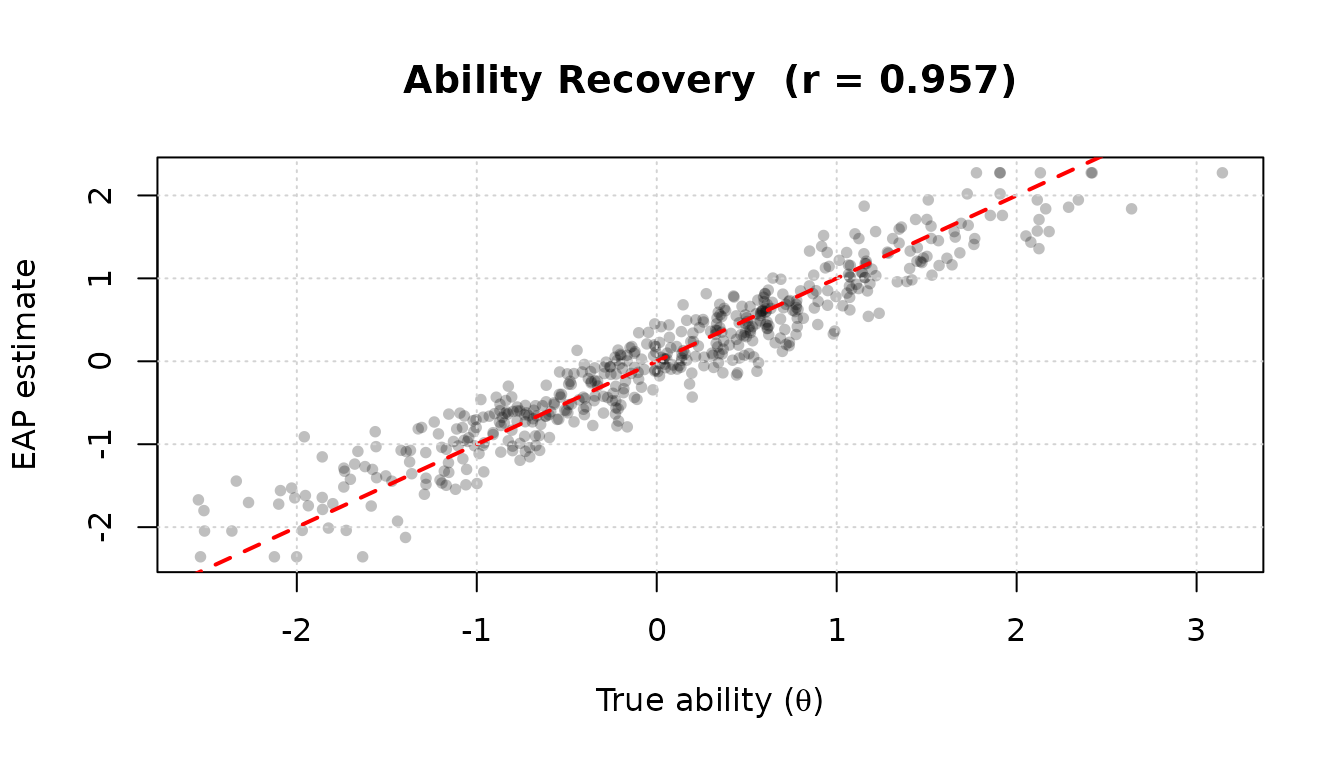
High correlation () between EAP estimates and the true simulated abilities confirms that the item calibration and scoring steps are working correctly.
What’s Next?
Now that you understand irtQ’s item metadata structure and the supported IRT models, you are ready to explore each analysis in depth:
| Topic | Article | Key Functions |
|---|---|---|
| Item parameter estimation | Item Parameter Estimation |
est_irt(), est_mg(),
est_item()
|
| Ability estimation | Ability Estimation | est_score() |
| Model-data fit | Model-Data Fit Evaluation |
irtfit(), sx2_fit()
|
| DIF detection | DIF Detection |
rdif(), grdif(),
catsib()
|
| Classification accuracy | Classification Accuracy and Consistency |
cac_lee(), cac_rud()
|
| Utilities | Utility Functions |
simdat(), drm(), prm(),
info(), traceline(), lwrc(),
gen.weight(), covirt(),
score_resp()
|
| Classical test theory (CTT) analysis | Classical Test Theory (CTT) Analysis |
ctt(), freq_score(),
ctt_distr()
|
| MST panel evaluation | MST Panel Evaluation and Simulation |
panel_info(), find_cut(),
reval_mst(), run_mst()
|