
MST Panel Evaluation and Simulation
Source:vignettes/articles/mst-panel-evaluation.Rmd
mst-panel-evaluation.RmdWhat is a Multistage-Adaptive Test (MST)?
A Multistage-Adaptive Test (MST) is a computer-based adaptive testing design that sits between fully adaptive Computerized Adaptive Testing (CAT) and traditional linear fixed-form testing. In an MST, the test is divided into stages, each containing one or more pre-assembled groups of items called modules. Routing rules, based on performance on earlier stages, determine which module a test taker receives at each subsequent stage.
The Basic Structure
A typical MST panel is described by its stage-module configuration. For example, a 1-3-3 panel has:
- Stage 1: 1 routing module; everyone starts with the same items
- Stage 2: 3 modules of varying difficulty (e.g., easy, medium, hard)
- Stage 3: 3 modules of varying difficulty (e.g., easy, medium, hard)
The diagram below illustrates the flow of test takers through a 1-3-3 panel (E = Easy, M = Medium, H = Hard):
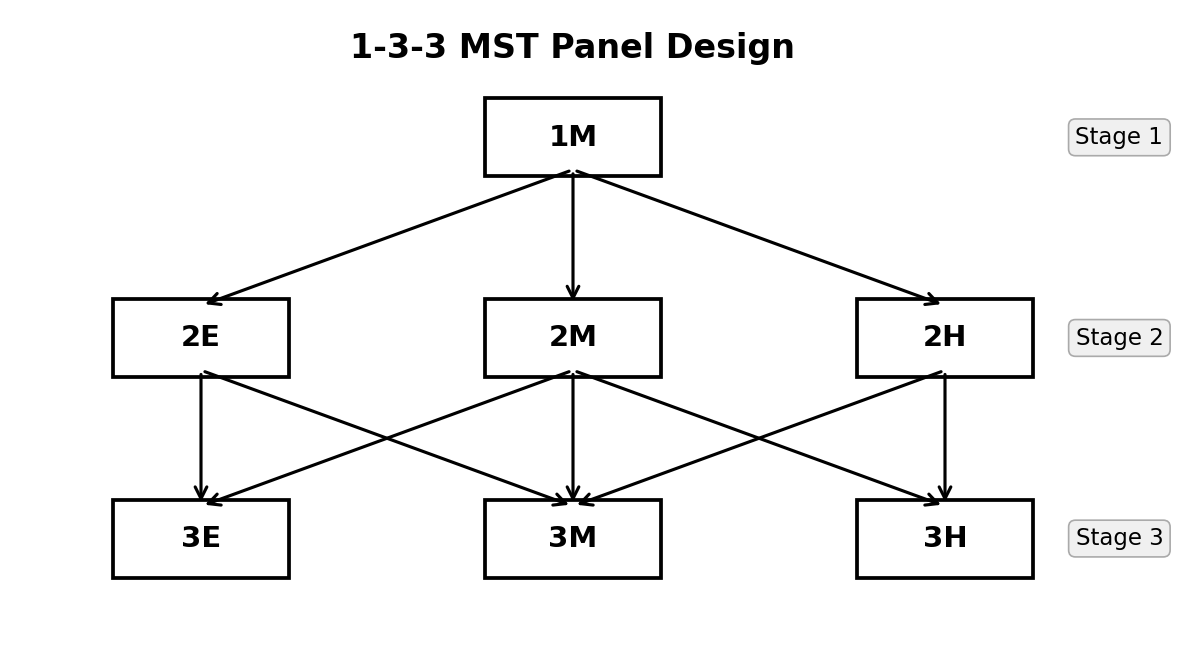
1-3-3 MST panel design. From Stage 1, all examinees begin at module 1M. After Stage 1, they are routed to one of three Stage 2 modules (2E, 2M, 2H) based on their estimated ability. After Stage 2, they are routed to one of three Stage 3 modules (3E, 3M, 3H).
A test taker’s pathway through the MST is the sequence of modules they take, such as 1M → 2E → 3E (for a low-ability examinee) or 1M → 2H → 3H (for a high-ability examinee). In a 1-3-3 panel above, there are 7 such pathways.
Advantages of MST Over Linear Tests and CAT
| Feature | Linear | CAT | MST |
|---|---|---|---|
| Adaptivity | None | Item-by-item | Stage-by-stage |
| Content review | Full review allowed | (Generally) Not allowed | Allowed within module |
| Item exposure control | Easy | Difficult | Moderate |
| Test assembly | Pre-assembled | On-the-fly | (Generally) Pre-assembled modules |
| Operational cost | Low | High | Moderate |
MST is especially popular in high-stakes certification and licensure exams because it allows examinees to review and change answers within a module (like a paper test) while still adapting the difficulty level to each examinee.
Why Simulate MST Panel Performance?
Designing an operational MST program is rarely a one-shot exercise. Test developers typically draft several candidate panel designs that differ in the number of stages and modules, the difficulty targeting of each module, the routing rule (fixed cut scores vs. an IRT-information-based router such as b-matching or maximum Fisher information), and the scoring method used at each stage. Before committing to one design operationally, they need a way to judge which candidate best serves the purpose of the testing program: a licensure exam may need to maximize precision near the pass/fail cut score, whereas a broad-range achievement test may need uniform precision across the entire ability continuum. Comparing candidate panels against goals like these has long relied on simulating how each design would behave with real examinees (Luecht & Nungester, 1998; Zenisky et al., 2009): generate examinees with known true abilities, route each one through a candidate panel exactly as a real test taker would be routed, and examine how closely the resulting ability estimates recover the true values.
irtQ provides two functions for exactly this
purpose. run_mst() simulates a full MST administration
(examinee by examinee, stage by stage) and reports the resulting ability
estimates and routing pathways. reval_mst() conducts the
MST evaluation analytically, via a recursion-based method (Lim et al., 2021), without simulating any
individual examinee. This vignette covers both, starting with
run_mst(). They describe an MST panel using the same
structural inputs, introduced next.
Input Data: The Building Blocks of an MST Panel
run_mst() and reval_mst() describe an MST
panel using the same core structural inputs, in addition to the item
metadata:
1. Item Bank (x)
A standard irtQ item metadata data frame (see
?shape_df or the Getting Started vignette). Each
row describes one item in the item bank. The columns are
id, cats, model,
par.1, par.2, etc.
2. Module Assignment Matrix (module)
A binary matrix with rows = items (same order as
x) and columns = modules. An entry of 1 in
row
,
column
means item
belongs to module
.
        M1  M2  M3  M4  M5  M6  M7
item 1 [  1   0   0   0   0   0   0 ]  ← item 1 is in module 1
item 2 [  1   0   0   0   0   0   0 ]
...
item 9 [  0   1   0   0   0   0   0 ]  ← item 9 is in module 2
...
In simMST, each item belongs to exactly one module, so
each row has exactly one 1. In general, an item should belong to at most
one module; items of the bank that are not used in the panel have rows
of 0. reval_mst() additionally requires a single routing
module in the first stage and that all modules in the same stage have
the same maximum sum score (for dichotomous items, the same number of
items); it stops with an error otherwise.
3. Route Map (route_map)
A binary square matrix of dimension (total modules × total modules). An entry of 1 in row , column means test takers can be routed from module directly to module .
For a 1-3-3 panel with 7 modules (M1-M7):
         M1 M2 M3 M4 M5 M6 M7
M1  ──→ [  0  1  1  1  0  0  0 ]   M1 routes to M2, M3, or M4
M2  ──→ [  0  0  0  0  1  1  0 ]   M2 routes to M5 or M6
M3  ──→ [  0  0  0  0  1  1  1 ]   M3 routes to M5, M6, or M7
M4  ──→ [  0  0  0  0  0  1  1 ]   M4 routes to M6 or M7
M5  ──→ [  0  0  0  0  0  0  0 ]   terminal (Stage 3)
M6  ──→ [  0  0  0  0  0  0  0 ]   terminal
M7  ──→ [  0  0  0  0  0  0  0 ]   terminal
Stage 1 modules are identified automatically as those with all-zero columns (no module routes to them). Terminal modules have all-zero rows.
4. Cut Scores (cut_score)
A list of numeric vectors, one element per routing stage transition. Each vector contains the IRT cut points used to determine which next-stage module a test taker receives.
For a 1-3-3 panel with 2 routing stages:
cut_score = list(
  c(-0.5, 0.5),   # Stage 1 → Stage 2: θ̂ < -0.5 → M2 (easy)
                  #                    -0.5 ≤ θ̂ < 0.5 → M3 (medium)
                  #                    θ̂ ≥ 0.5 → M4 (hard)
  c(-0.6, 0.6)    # Stage 2 → Stage 3: θ̂ < -0.6 → easy module
                  #                    -0.6 ≤ θ̂ < 0.6 → medium module
                  #                    θ̂ ≥ 0.6 → hard module
)
The cut scores of a transition are tied to the modules of the next
stage in the order of the module indices: the first cut score separates
the first and second modules, the second separates the second and third.
When a module can reach only some of the next-stage modules, only the
cut scores that separate those modules apply. In the route map above, a
test taker in M4 can reach only M6 or M7, so the second Stage 3 cut
score alone decides between them (θ̂ below it goes to M6, θ̂ at or above
it to M7). reval_mst() and run_mst() use the
same rule.
cut_score is required by reval_mst(), which
always uses inverse-TCC scoring internally, and by
run_mst() whenever route_method = NULL. When
route_method is instead "bmat" or
"mfi", run_mst() ignores
cut_score entirely and routes from item difficulty or test
information directly, as shown below.
5. True Ability or Observed Responses (theta /
response)
reval_mst() always treats theta as a fixed
ability grid at which to evaluate bias and CSEM analytically.
run_mst() instead uses theta (or
response) to simulate individual examinees:
- Supplying
theta: a numeric vector of true ability values, one per simulated examinee.run_mst()generates each examinee’s item responses internally from these true values,x, andD. - Supplying
responseinstead: an already-generated item response matrix (e.g., fromsimdat(), or real observed data).thetacan still be supplied alongsideresponse, purely for RMSE comparison after the fact; it plays no role in generating the responses themselves.
How theta is constructed changes what the simulation
tells you. Drawing it randomly from an assumed population ability
distribution (rnorm(1000, 0, 1) in the examples below)
evaluates the panel’s overall performance across a
single, population-representative batch of examinees, much as a testing
program would experience it operationally. Fixing theta at
one value and simulating many replications at that single point instead
evaluates the panel’s conditional bias and precision at
that specific ability level, the same quantity reval_mst()
computes analytically, without any simulation. Repeating that
single-point simulation across a grid of ability values is exactly the
traditional Monte Carlo approach described later in this article, and
Example 6 demonstrates it directly with run_mst().
6. Scoring Specification (route_score /
final_score)
run_mst() separates the scoring method used for routing
decisions at intermediate stages (route_score) from the
method used to report each examinee’s final score
(final_score). Both arguments take a named list whose
method element selects one of irtQ’s
ability estimators: "ML", "WL",
"MLF", "MAP", "EAP",
"EAP.SUM", or "INV.TCC", and whose remaining
elements supply that estimator’s own arguments, e.g. range
for "ML"/"WL", or norm.prior and
nquad for "EAP":
route_score = list(method = "EAP", norm.prior = c(0, 1), nquad = 41)
final_score = list(method = "ML", range = c(-4, 4))
Routing and final scoring need not use the same method, and the more
principled choice runs this way: "EAP" is usually preferred
for routing, because the intermediate ability estimate must always be
well-defined, even from a short module. The Stage 1 routing module in
particular may have so few items that an examinee answers every one
correctly or every one incorrectly, a pattern for which
"ML" has no finite solution. "EAP"’s prior
keeps the routing estimate finite and stable no matter the response
pattern. For the final reported score, "ML" is often
preferred instead: by the last stage examinees have answered enough
items that such extreme patterns are rare, and "ML" avoids
the shrinkage toward the population mean that "EAP"’s prior
introduces. "INV.TCC" recovers ability from the observed
sum score via the inverse Test Characteristic Curve (the same method
reval_mst() uses internally) and is useful when a testing
program reports summed scores directly.
The simMST Dataset
irtQ includes simMST, a built-in
dataset that packages the four inputs described above plus a vector of
ability levels (theta). This dataset represents a
1-3-3 MST panel, assembled using module-level target
test information functions and design constraints similar to those used
in the simulation study of Lim et al.
(2021) (it is not the identical dataset from that study), with
the following characteristics:
- 7 modules across 3 stages
- 8 items per module across 7 modules (56 unique items total, no item shared across modules)
- All items follow the 3-parameter logistic model (3PLM)
- Item parameters calibrated to span a broad ability range
library(irtQ)

# Inspect the simMST dataset
str(simMST, max.level = 1)
#> List of 5
#>  $ item_bank:'data.frame':   56 obs. of  6 variables:
#>  $ module   : int [1:56, 1:7] 0 0 0 1 0 0 0 0 0 0 ...
#>  $ route_map: int [1:7, 1:7] 0 0 0 0 0 0 0 1 0 0 ...
#>   ..- attr(*, "dimnames")=List of 2
#>  $ cut_score:List of 2
#>  $ theta    : num [1:81] -4 -3.9 -3.8 -3.7 -3.6 -3.5 -3.4 -3.3 -3.2 -3.1 ...
# Item bank: standard irtQ metadata format
head(simMST$item_bank, 10)
#>    id cats model     par.1       par.2      par.3
#> 1   1    2  3PLM 0.8046689  0.88877424 0.07111049
#> 2   2    2  3PLM 1.1698814  1.92935685 0.09127957
#> 3   3    2  3PLM 1.0684706  0.41364009 0.11193439
#> 4   4    2  3PLM 1.2212463  1.53688842 0.07581786
#> 5   5    2  3PLM 1.4571606 -0.75722758 0.06916838
#> 6   6    2  3PLM 1.3195904 -0.82946802 0.05324622
#> 7   7    2  3PLM 0.8683278  0.25561228 0.06429254
#> 8   8    2  3PLM 1.2138528  0.68499259 0.03843348
#> 9   9    2  3PLM 1.2447288  0.05907495 0.12361107
#> 10 10    2  3PLM 1.0414900 -0.42144469 0.08158022
# Module matrix: 56 items × 7 modules
dim(simMST$module)
#> [1] 56  7

# First 16 rows (items 1-16, all 7 modules)
simMST$module[1:16, ]
#>       [,1] [,2] [,3] [,4] [,5] [,6] [,7]
#>  [1,]    0    0    0    1    0    0    0
#>  [2,]    0    0    0    1    0    0    0
#>  [3,]    0    0    0    0    0    0    1
#>  [4,]    1    0    0    0    0    0    0
#>  [5,]    0    1    0    0    0    0    0
#>  [6,]    0    0    0    0    1    0    0
#>  [7,]    0    0    0    1    0    0    0
#>  [8,]    0    0    0    0    0    0    1
#>  [9,]    0    0    0    0    0    1    0
#> [10,]    0    0    0    0    0    1    0
#> [11,]    0    0    0    0    0    0    1
#> [12,]    0    0    0    0    0    1    0
#> [13,]    0    0    1    0    0    0    0
#> [14,]    0    0    0    0    1    0    0
#> [15,]    0    0    1    0    0    0    0
#> [16,]    0    0    0    0    1    0    0
# Route map: 7 × 7 transition matrix
simMST$route_map
#>      V1 V2 V3 V4 V5 V6 V7
#> [1,]  0  1  1  1  0  0  0
#> [2,]  0  0  0  0  1  1  0
#> [3,]  0  0  0  0  1  1  1
#> [4,]  0  0  0  0  0  1  1
#> [5,]  0  0  0  0  0  0  0
#> [6,]  0  0  0  0  0  0  0
#> [7,]  0  0  0  0  0  0  0
The route_map shows:
- Row 1 (Module 1, Stage 1): routes to columns 2, 3, 4 (the three Stage 2 modules)
- Rows 2-4 (Modules 2-4, Stage 2): each routes to two or three Stage 3 modules
- Rows 5-7 (Modules 5-7, Stage 3): all zeros (terminal modules)
# Cut scores: 2 routing transitions for 3 stages
simMST$cut_score
#> $stage.2
#> [1] -0.4450901  0.4588774
#>
#> $stage.3
#> [1] -0.4170988 0.4531584Simulating an MST Administration with run_mst()
irtQ provides run_mst() to carry out
exactly this kind of simulation. Given an item bank, a
route_map, a module matrix, and a vector of
true abilities (or a pre-generated response matrix),
run_mst() simulates the full MST administration for every
examinee (stage-by-stage routing and final scoring) and returns the
resulting ability estimates together with the module pathway each
examinee traveled.
The examples below use the same simMST 1-3-3 panel
introduced above: a routing module at Stage 1, followed by three modules
of varying difficulty at each of Stages 2 and 3.
run_mst() supports three routing strategies. Two require
no fixed cut scores at all: the default,
route_method = "bmat", routes each examinee to the
reachable module whose mean item difficulty is closest to their current
ability estimate, and route_method = "mfi" routes to the
reachable module with the highest test information function (TIF) value
at their current estimate. The third, cut-score routing
(route_method = NULL), compares the current estimate
against a fixed set of cut scores. In all three, the current estimate at
the end of a stage is computed from the responses to all modules the
examinee has taken so far, not only the module just completed. Start
with the default, bmat:
# Item bank and panel structure from simMST
x         <- simMST$item_bank
module    <- simMST$module
route_map <- simMST$route_map

# 1,000 simulated examinees with true abilities from N(0, 1)
set.seed(42)
theta_true <- rnorm(1000, mean = 0, sd = 1)

# bmat routing: no cut scores needed
sim_bmat <- run_mst(
  x            = x,
  route_map    = route_map,
  module       = module,
  theta        = theta_true,
  D            = 1.702,
  route_method = "bmat",
  route_score  = list(method = "EAP", norm.prior = c(0, 1), nquad = 41),
  final_score  = list(method = "ML", range = c(-4, 4)),
  se           = TRUE
)
print(sim_bmat)
#>
#> Call:
#> run_mst(x = x, route_map = route_map, module = module, theta = theta_true,
#>     D = 1.702, route_method = "bmat", route_score = list(method = "EAP",
#>         norm.prior = c(0, 1), nquad = 41), final_score = list(method = "ML",
#>         range = c(-4, 4)), se = TRUE)
#>
#> MST Simulation Results
#> ========================================
#>
#> Panel structure:
#>   Stages              : 3
#>   Modules per stage   : 1 - 3 - 3
#>   Valid pathways      : 7
#>   Routing method      : bmat (b-matching)
#>
#> Number of examinees : 1000
#>
#> Ability estimation:
#>   Routing method      : EAP
#>   Final method        : ML
#>
#> Final ability estimates (est.theta):
#>   Mean : -0.012
#>   SD   : 1.111
#>   Min  : -4.000
#>   Max  : 4.000
#>
#> Estimation accuracy (est.theta - true.theta):
#>   Bias : 0.014
#>   RMSE : 0.327
#>
#> Module frequency by stage:
#>   Stage 1: Module 1: 1000 (100.0%)
#>   Stage 2: Module 2: 302 (30.2%),  Module 3: 314 (31.4%),  Module 4: 384 (38.4%)
#>   Stage 3: Module 5: 389 (38.9%),  Module 6: 214 (21.4%),  Module 7: 397 (39.7%)
A closely related alternative is maximum Fisher information
(MFI) routing (route_method = "mfi"): instead of
comparing mean item difficulty, it routes each examinee to the reachable
module that provides the highest TIF value at their current ability
estimate.
sim_mfi <- run_mst(
  x            = x,
  route_map    = route_map,
  module       = module,
  theta        = theta_true,
  D            = 1.702,
  route_method = "mfi",
  route_score  = list(method = "EAP", norm.prior = c(0, 1), nquad = 41),
  final_score  = list(method = "ML", range = c(-4, 4)),
  se           = TRUE
)
print(sim_mfi)
#>
#> Call:
#> run_mst(x = x, route_map = route_map, module = module, theta = theta_true,
#>     D = 1.702, route_method = "mfi", route_score = list(method = "EAP",
#>         norm.prior = c(0, 1), nquad = 41), final_score = list(method = "ML",
#>         range = c(-4, 4)), se = TRUE)
#>
#> MST Simulation Results
#> ========================================
#>
#> Panel structure:
#>   Stages              : 3
#>   Modules per stage   : 1 - 3 - 3
#>   Valid pathways      : 7
#>   Routing method      : mfi (Maximum Fisher Information)
#>
#> Number of examinees : 1000
#>
#> Ability estimation:
#>   Routing method      : EAP
#>   Final method        : ML
#>
#> Final ability estimates (est.theta):
#>   Mean : -0.019
#>   SD   : 1.083
#>   Min  : -4.000
#>   Max  : 4.000
#>
#> Estimation accuracy (est.theta - true.theta):
#>   Bias : 0.007
#>   RMSE : 0.310
#>
#> Module frequency by stage:
#>   Stage 1: Module 1: 1000 (100.0%)
#>   Stage 2: Module 2: 279 (27.9%),  Module 3: 475 (47.5%),  Module 4: 246 (24.6%)
#>   Stage 3: Module 5: 350 (35.0%),  Module 6: 350 (35.0%),  Module 7: 300 (30.0%)
MFI routing assumes each module’s TIF curve behaves as intended, peaking higher for harder modules as theta increases, and higher for easier modules as theta decreases. In practice this assumption can fail: a harder module’s TIF curve may unexpectedly peak at a low theta value, so that low-ability examinees who should be routed to an easy module instead get routed into the harder one. This is called an anomalous routing, or path reversal, and it is the opposite of what an MST is designed to do.
Alternatively, setting route_method = NULL switches to
traditional cut-score routing (the design most commonly
used in operational MST programs), in which each examinee’s intermediate
ability estimate is compared against a fixed set of cut scores to decide
the next module:
# Fixed routing cut scores bundled with simMST
cut_score <- simMST$cut_score   # list(c(-0.45, 0.46), c(-0.42, 0.45))

sim_cut <- run_mst(
  x            = x,
  route_map    = route_map,
  module       = module,
  theta        = theta_true,
  D            = 1.702,
  route_method = NULL,
  cut_score    = cut_score,
  route_score  = list(method = "EAP", norm.prior = c(0, 1), nquad = 41),
  final_score  = list(method = "ML", range = c(-4, 4)),
  se           = TRUE
)
print(sim_cut)
#>
#> Call:
#> run_mst(x = x, route_map = route_map, module = module, theta = theta_true,
#>     D = 1.702, route_method = NULL, cut_score = cut_score, route_score = list(method = "EAP",
#>         norm.prior = c(0, 1), nquad = 41), final_score = list(method = "ML",
#>         range = c(-4, 4)), se = TRUE)
#>
#> MST Simulation Results
#> ========================================
#>
#> Panel structure:
#>   Stages              : 3
#>   Modules per stage   : 1 - 3 - 3
#>   Valid pathways      : 7
#>   Routing method      : cut-score based
#>
#> Number of examinees : 1000
#>
#> Ability estimation:
#>   Routing method      : EAP
#>   Final method        : ML
#>
#> Final ability estimates (est.theta):
#>   Mean : -0.016
#>   SD   : 1.107
#>   Min  : -4.000
#>   Max  : 4.000
#>
#> Estimation accuracy (est.theta - true.theta):
#>   Bias : 0.010
#>   RMSE : 0.331
#>
#> Module frequency by stage:
#>   Stage 1: Module 1: 1000 (100.0%)
#>   Stage 2: Module 2: 266 (26.6%),  Module 3: 456 (45.6%),  Module 4: 278 (27.8%)
#>   Stage 3: Module 5: 324 (32.4%),  Module 6: 361 (36.1%),  Module 7: 315 (31.5%)
Deriving Principled Cut Scores with find_cut()
Where do cut scores like these come from in the first place? One principled choice is to derive them directly from the modules’ TIF curves themselves: the natural boundary between an easy and a hard module is the theta value at which the hard module’s TIF first overtakes the easy module’s TIF. Below that point the easier module is more informative; above it, the harder module is. This is also the fix for the anomalous-routing problem described above for MFI routing: by fixing the cut point at this proper crossing, low-ability examinees can never be routed into the harder module, no matter how its TIF curve behaves at the extremes.
find_cut() automates this search. For every pair of
adjacent modules at each stage transition, it scans the theta scale for
crossings between the two modules’ TIF curves, keeps only the “proper”
crossing (the TIF difference changing sign from negative to positive),
and returns the result as a cut_score list that can be
passed directly to run_mst().
In fact, the cut scores bundled in simMST$cut_score were
generated this same way when the panel was assembled, so recomputing
them here should reproduce the same values:
cut_result <- find_cut(
  x         = x,
  module    = module,
  route_map = route_map,
  D         = 1.702
)
print(cut_result)
#> MST TIF-Crossing Cut Score Results
#> ==================================================
#>
#> stage.2
#> -----------------------------------
#>   Modules (index order)    : 2, 3, 4
#>   Modules (difficulty order): 2, 3, 4
#>   Mean item locations      : -0.87, -0.0574, 0.7858
#>   Selected cut score(s)    : -0.4451, 0.4589
#>   Pair details:
#>     [mod2_vs_mod3]
#>       Proper crossing(s)    : 1  [theta = -0.4451]
#>       Anomalous crossing(s) : 1  [theta = 3.3893]  (excluded)
#>       Selected cut score    : -0.4451
#>     [mod3_vs_mod4]
#>       Proper crossing(s)    : 1  [theta = 0.4589]
#>       Selected cut score    : 0.4589
#>
#> stage.3
#> -----------------------------------
#>   Modules (index order)    : 5, 6, 7
#>   Modules (difficulty order): 5, 6, 7
#>   Mean item locations      : -0.5586, -0.042, 0.5066
#>   Selected cut score(s)    : -0.4171, 0.4532
#>   Pair details:
#>     [mod5_vs_mod6]
#>       Proper crossing(s)    : 1  [theta = -0.4171]
#>       Anomalous crossing(s) : 1  [theta = 1.617]  (excluded)
#>       Selected cut score    : -0.4171
#>     [mod6_vs_mod7]
#>       Proper crossing(s)    : 1  [theta = 0.4532]
#>       Anomalous crossing(s) : 1  [theta = -1.9874]  (excluded)
#>       Selected cut score    : 0.4532
#> ==================================================
#> Usage: run_mst(..., route_method = NULL, cut_score = <result>$cut_score)

# Recomputing reproduces the cut scores already bundled in simMST
cut_result$cut_score
#> $stage.2
#> [1] -0.4450901  0.4588774
#>
#> $stage.3
#> [1] -0.4170988  0.4531584
simMST$cut_score
#> $stage.2
#> [1] -0.4450901  0.4588774
#>
#> $stage.3
#> [1] -0.4170988  0.4531584
Calling plot() on the find_cut object
visualizes each stage’s module TIF curves, with the selected cut score
drawn as a solid vertical line and any excluded anomalous crossings
drawn as dashed red lines:
plot(cut_result)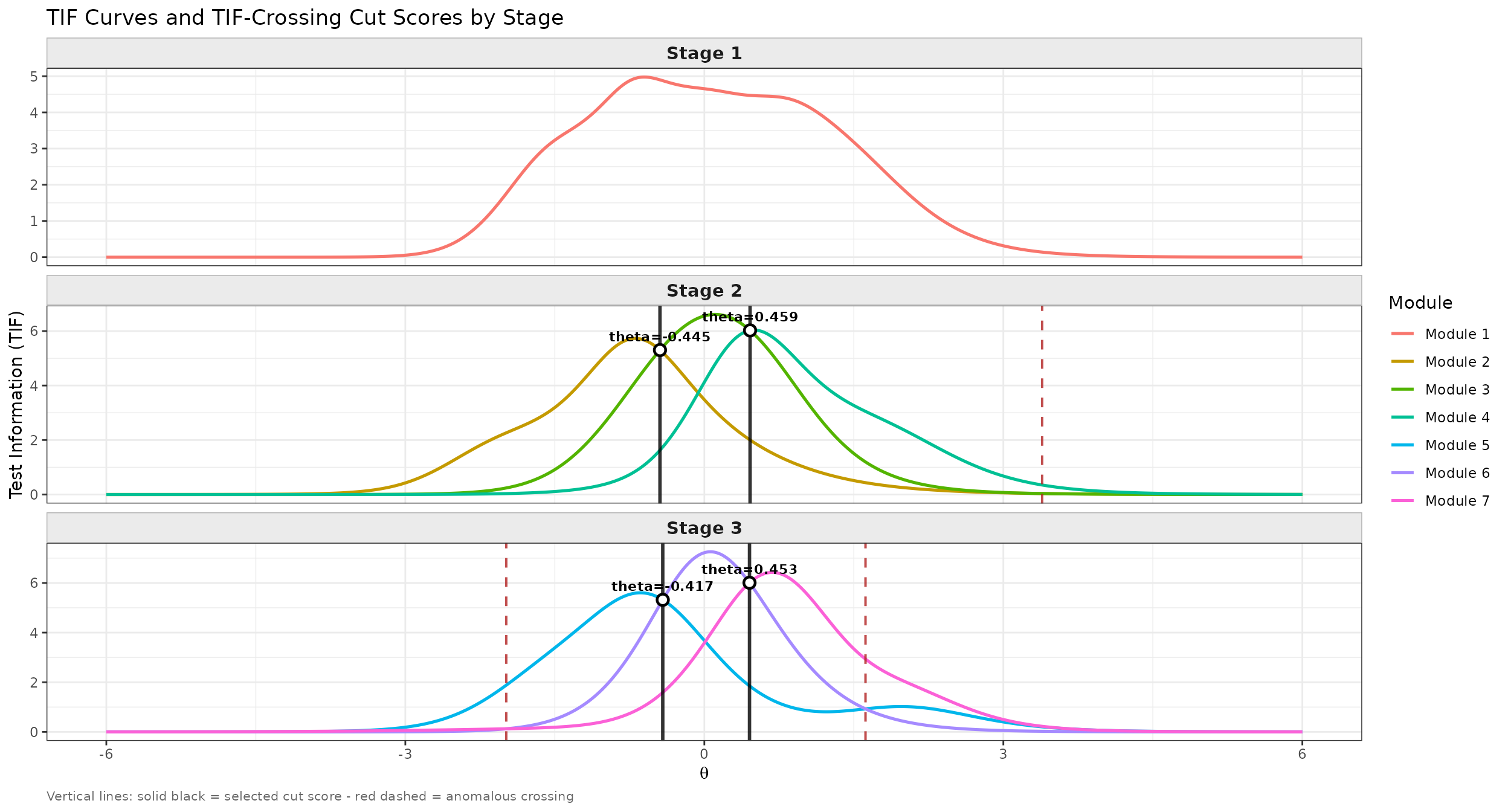
TIF curves for every module in the simMST panel, faceted by stage, with TIF-crossing cut scores from find_cut().
The derived cut scores plug into run_mst() exactly like
any other fixed cut scores, by setting
route_method = NULL:
sim_findcut <- run_mst(
  x            = x,
  route_map    = route_map,
  module       = module,
  theta        = theta_true,
  D            = 1.702,
  route_method = NULL,
  cut_score    = cut_result$cut_score,
  route_score  = list(method = "EAP", norm.prior = c(0, 1), nquad = 41),
  final_score  = list(method = "ML", range = c(-4, 4)),
  se           = TRUE
)
print(sim_findcut)
#>
#> Call:
#> run_mst(x = x, route_map = route_map, module = module, theta = theta_true,
#>     D = 1.702, route_method = NULL, cut_score = cut_result$cut_score,
#>     route_score = list(method = "EAP", norm.prior = c(0, 1),
#>         nquad = 41), final_score = list(method = "ML", range = c(-4,
#>         4)), se = TRUE)
#>
#> MST Simulation Results
#> ========================================
#>
#> Panel structure:
#>   Stages              : 3
#>   Modules per stage   : 1 - 3 - 3
#>   Valid pathways      : 7
#>   Routing method      : cut-score based
#>
#> Number of examinees : 1000
#>
#> Ability estimation:
#>   Routing method      : EAP
#>   Final method        : ML
#>
#> Final ability estimates (est.theta):
#>   Mean : -0.013
#>   SD   : 1.081
#>   Min  : -4.000
#>   Max  : 4.000
#>
#> Estimation accuracy (est.theta - true.theta):
#>   Bias : 0.013
#>   RMSE : 0.324
#>
#> Module frequency by stage:
#>   Stage 1: Module 1: 1000 (100.0%)
#>   Stage 2: Module 2: 278 (27.8%),  Module 3: 453 (45.3%),  Module 4: 269 (26.9%)
#>   Stage 3: Module 5: 330 (33.0%),  Module 6: 357 (35.7%),  Module 7: 313 (31.3%)
The cut scores are the same as in sim_cut; the small
differences come from newly simulated responses, which the next
subsection removes by passing response.
Comparing Routing Methods on Identical Responses with
response
All of the calls above let run_mst() simulate item
responses internally from theta. When the goal is to
compare two routing or scoring strategies fairly, simulation noise in
the responses themselves should not be allowed to confound the
comparison. Generating the response matrix once with
simdat() and feeding it through the response
argument removes that source of noise, and is also how
run_mst() would be used with real, already-observed
response data:
# Generate one response matrix from a fresh set of true abilities
set.seed(123)
theta_true2 <- rnorm(500, mean = 0, sd = 1)
resp_matrix <- simdat(x = x, theta = theta_true2, D = 1.702)
# resp_matrix is an N x J matrix (N examinees x J total items in the bank)

# bmat routing on the pre-generated responses
result_A <- run_mst(
  x            = x,
  route_map    = route_map,
  module       = module,
  theta        = theta_true2,    # kept only for RMSE evaluation below
  response     = resp_matrix,    # pre-generated N x J response matrix
  D            = 1.702,
  route_method = "bmat",
  route_score  = list(method = "EAP", norm.prior = c(0, 1), nquad = 41),
  final_score  = list(method = "ML", range = c(-4, 4)),
  se           = FALSE
)

# find_cut()-based cut-score routing on the SAME responses
result_B <- run_mst(
  x            = x,
  route_map    = route_map,
  module       = module,
  theta        = theta_true2,
  response     = resp_matrix,    # identical responses -> fair comparison
  D            = 1.702,
  route_method = NULL,
  cut_score    = cut_result$cut_score,
  route_score  = list(method = "EAP", norm.prior = c(0, 1), nquad = 41),
  final_score  = list(method = "ML", range = c(-4, 4)),
  se           = FALSE
)

# Any RMSE difference now reflects the routing rule alone, not response noise
rmse_A <- sqrt(mean((result_A$est.theta - theta_true2)^2))
rmse_B <- sqrt(mean((result_B$est.theta - theta_true2)^2))
cat(sprintf("RMSE (bmat):                 %.4f\n", rmse_A))
#> RMSE (bmat):                 0.3068
cat(sprintf("RMSE (find_cut cut scores):  %.4f\n", rmse_B))
#> RMSE (find_cut cut scores):  0.3050
All five calls above return the same kind of result regardless of the
routing rule or input format used: a final ability estimate
(est.theta), its standard error (se.theta,
when se = TRUE), and the module pathway taken by each
examinee (path).
Inspecting the run_mst() Output
print() reports only aggregated information: the panel
structure, the routing and final scoring methods, summary statistics
(mean, SD, min, max) of the final estimates, and, when true abilities
are supplied, overall bias and RMSE. Every examinee’s individual results
live in named components of the returned object itself:
# Final ability estimate and its standard error, one value per examinee
head(sim_bmat$est.theta)
#> [1]  1.25259186 -0.58316775  0.63574972  0.56422861  0.51421967 -0.03858902
head(sim_bmat$se.theta)
#> [1] 0.2878269 0.2562197 0.2443803 0.2442056 0.2447564 0.2335472

# Routing and final estimates at every stage: an N x n.stage matrix
head(sim_bmat$theta.route)
#>         stage.1    stage.2     stage.3
#> [1,]  0.8423104  1.3037657  1.25259186
#> [2,] -0.4208651 -0.4527758 -0.58316775
#> [3,]  0.3826359  0.5179248  0.63574972
#> [4,]  0.3826359  0.5522797  0.56422861
#> [5,]  0.3826359  0.2903304  0.51421967
#> [6,] -0.0606256  0.1401152 -0.03858902

# Module index administered at every stage: an N x n.stage matrix
head(sim_bmat$path)
#>      stage.1 stage.2 stage.3
#> [1,]       1       4       7
#> [2,]       1       3       5
#> [3,]       1       4       7
#> [4,]       1       4       7
#> [5,]       1       4       7
#> [6,]       1       3       6
se.theta in particular never appears in
print() output, so accessing it directly is the only way to
see how estimation precision varies across examinees, for example, by
the Stage 3 (final) module each examinee landed in:
# final (Stage 3) module of each examinee
final_mod <- sim_bmat$path[, ncol(sim_bmat$path)]

# ML estimates at a limit of `range` (c(-4, 4) in `final_score` above) have
# no finite SE (reported as 99.9999)
at_limit <- abs(sim_bmat$est.theta) >= 4

# per final module: examinees, estimates at a limit, and mean SE of the rest
data.frame(
  module   = sort(unique(final_mod)),
  n        = as.vector(table(final_mod)),
  n_limit  = as.vector(tapply(at_limit, final_mod, sum)),
  mean_se  = as.vector(tapply(sim_bmat$se.theta[!at_limit],
                              final_mod[!at_limit], mean))
)
#>   module   n n_limit   mean_se
#> 1      5 389       7 0.3004882
#> 2      6 214       0 0.2415196
#> 3      7 397      10 0.2799251
When an ML estimate reaches a limit of range (here -4 or
4, for example after all-correct or all-incorrect responses), its
standard error is not finite and run_mst() reports 99.9999,
as est_score() does. These values are flags rather than
standard errors, so they are counted separately and left out of the
mean. Examinees routed to the easy or hard final module (modules 5 and
7) have larger standard errors than those in the medium module, and they
are the only ones whose estimates reach the limits.
The full list of return components, including panel
(reused from panel_info()), true.theta, and
full.resp (the complete item-level response matrix,
populated only when return_full_resp = TRUE), is summarized
in the Function Reference section near the end of this article.
All five calls above drew theta_true (or
theta_true2) from a single population distribution,
,
appropriate for an overall, population-representative
look at how the panel performs across a realistic mix of examinees, the
way a testing program would experience it operationally. The
complementary question (how the panel performs
conditionally, at one specific ability level) requires
fixing
instead of sampling it, and repeating the simulation many times at that
single point. Doing this across a whole grid of ability levels is
exactly the traditional approach described next.
The Challenge of Evaluating MST Panels
Before deploying an MST panel operationally, test developers need to evaluate its measurement quality: how accurately and precisely does the panel estimate examinee ability at each level of the latent trait ?
The two key evaluation metrics are:
- Conditional Bias: The average difference between the ability estimate and the true ability , evaluated at each level. Ideally, bias should be near zero across the full ability range.
- Conditional Standard Error of Measurement (CSEM): The standard deviation of ability estimates at each level. Lower CSEM means more precise measurement.
The Traditional Approach: Monte Carlo Simulation
Conditional evaluation via simulation means repeating the
run_mst() procedure shown above systematically across a
fixed grid of ability levels, with many replications at each grid
point:
- Fix a set of true ability levels
- For each , generate thousands of simulated response patterns
- Route each simulated examinee through the panel (exactly as
run_mst()does above) using the chosen routing rule (cut scores, b-matching, or maximum information) - Estimate ability from each simulated response and compute the mean and variance of the estimates
- Bias = mean() , CSEM =
run_mst() already automates Steps 2-4 for a single
and a single batch of replications; a full evaluation just wraps it in a
loop over the ability grid with a sufficiently large number of
replications per grid point (Example 6 below demonstrates exactly this).
This approach is conceptually simple, but looping run_mst()
this way inherits several practical drawbacks:
- Computationally inefficient: Thousands of response patterns must be generated and scored
- Stochastic: Results fluctuate across simulation replications
- Time-consuming: Evaluating many panel designs or cut score configurations requires many separate simulation runs
The Recursion-Based Analytical Approach:
reval_mst()
Lim et al. (2021) proposed a fundamentally different approach: instead of simulating individual examinees, the method directly computes the exact probability distribution of every possible observed score at every stage and pathway using a recursive algorithm.
The key insight is that the conditional distribution of the observed sum score along any pathway can be built up stage by stage using the Lord-Wingersky recursion (Lord & Wingersky, 1984). Given the conditional score distribution of the modules visited so far, the joint distribution at the next stage can be computed exactly, without any random sampling.
Here is the core logic of the recursion:
Stage 1: Compute for the routing module using the Lord-Wingersky recursion, where is the total score on Stage 1.
Routing: For each possible score on Stage 1, determine which Stage 2 module a test taker would be routed to (using the cut scores). This converts the score distribution into a pathway probability.
Stage 2: For each Stage 2 pathway, compute the joint distribution by convolving the Stage 1 score distribution with the conditional distribution of the assigned Stage 2 module.
Continue recursively through all stages.
-
Ability estimation: Convert each possible final sum score to a estimate using the inverse Test Characteristic Curve (TCC) method, the method implied by IRT-based summed scoring.
Note on linear interpolation (
intpol): When items have non-zero guessing parameters (e.g., 3PLM), the expected sum score never falls to or below the sum of the guessing parameters, so no exists for observed scores less than or equal to that sum; no exists for the maximum possible score either. Withintpol = TRUE(the default), the low scores are mapped by linear interpolation between the point and the lowest TCC-reachable score point, and the maximum score receives (the two values ofrange.tcc), so that every possible sum score receives an ability estimate rather thanNA. Evaluate: Compute the conditional mean and variance of given the true , and derive conditional bias and CSEM.
This method is:
- Exact: The probability distributions are computed analytically, not approximated by random sampling
- Fast: Computation takes seconds, not minutes or hours
- Deterministic: Results are reproducible without any simulation noise
- General: Any panel design, cut score configuration, or ability grid can be evaluated in a single function call
The reval_mst() function in irtQ
implements this recursion-based method, computing the same conditional
bias and CSEM that the Monte Carlo loop above estimates by simulation,
but analytically, in a single function call and without any simulation
noise.
Example 1: Evaluating the simMST Panel
With all inputs in place, running reval_mst() is
straightforward:
# Extract components from simMST
x         <- simMST$item_bank
module    <- simMST$module
route_map <- simMST$route_map
cut_score <- simMST$cut_score
theta     <- simMST$theta

# Evaluate the 1-3-3 MST panel
eval_result <- reval_mst(
  x          = x,
  D          = 1.702,
  route_map  = route_map,
  module     = module,
  cut_score  = cut_score,
  theta      = theta,
  range.tcc  = c(-7, 7)
)
The function returns a named list with 7 components. The most
important is eval.tb, the evaluation summary table:
# Evaluation table: theta, mu, sigma2, bias, csem
print(eval_result$eval.tb)
#>    theta           mu     sigma2         bias      csem
#> 1   -4.0 -4.808121816 3.42224454 -0.808121816 1.8499310
#> 2   -3.9 -4.789018118 3.43809047 -0.889018118 1.8542089
#> 3   -3.8 -4.766227063 3.45633941 -0.966227063 1.8591233
#> 4   -3.7 -4.739003829 3.47720522 -1.039003829 1.8647266
#> 5   -3.6 -4.706457627 3.50082146 -1.106457627 1.8710482
#> 6   -3.5 -4.667529929 3.52716739 -1.167529929 1.8780754
#> 7   -3.4 -4.620974274 3.55595499 -1.220974274 1.8857240
#> 8   -3.3 -4.565341410 3.58646261 -1.265341410 1.8937958
#> 9   -3.2 -4.498975738 3.61729989 -1.298975738 1.9019201
#> 10  -3.1 -4.420032010 3.64609197 -1.320032010 1.9094743
#> 11  -3.0 -4.326524656 3.66908363 -1.326524656 1.9154852
#> 12  -2.9 -4.216425519 3.68069437 -1.316425519 1.9185136
#> 13  -2.8 -4.087827618 3.67311048 -1.287827618 1.9165361
#> 14  -2.7 -3.939190342 3.63608699 -1.239190342 1.9068526
#> 15  -2.6 -3.769671646 3.55723963 -1.169671646 1.8860646
#> 16  -2.5 -3.579531040 3.42319361 -1.079531040 1.8501875
#> 17  -2.4 -3.370550870 3.22192852 -0.970550870 1.7949731
#> 18  -2.3 -3.146374631 2.94638073 -0.846374631 1.7165025
#> 19  -2.2 -2.912612920 2.59873030 -0.712612920 1.6120578
#> 20  -2.1 -2.676548271 2.19389663 -0.576548271 1.4811808
#> 21  -2.0 -2.446322106 1.76007533 -0.446322106 1.3266783
#> 22  -1.9 -2.229645390 1.33450055 -0.329645390 1.1552058
#> 23  -1.8 -2.032321625 0.95460517 -0.232321625 0.9770390
#> 24  -1.7 -1.857088754 0.64771766 -0.157088754 0.8048091
#> 25  -1.6 -1.703286390 0.42419405 -0.103286390 0.6513018
#> 26  -1.5 -1.567529547 0.27740271 -0.067529547 0.5266903
#> 27  -1.4 -1.445069807 0.18987969 -0.045069807 0.4357519
#> 28  -1.3 -1.331207524 0.14154025 -0.031207524 0.3762184
#> 29  -1.2 -1.222225352 0.11571234 -0.022225352 0.3401652
#> 30  -1.1 -1.115711117 0.10132976 -0.015711117 0.3183234
#> 31  -1.0 -1.010467373 0.09223884 -0.010467373 0.3037085
#> 32  -0.9 -0.906250277 0.08548769 -0.006250277 0.2923828
#> 33  -0.8 -0.803427274 0.07989210 -0.003427274 0.2826519
#> 34  -0.7 -0.702526078 0.07520746 -0.002526078 0.2742398
#> 35  -0.6 -0.603713902 0.07166265 -0.003713902 0.2676988
#> 36  -0.5 -0.506419973 0.06957502 -0.006419973 0.2637708
#> 37  -0.4 -0.409361950 0.06900157 -0.009361950 0.2626815
#> 38  -0.3 -0.311031582 0.06954823 -0.011031582 0.2637200
#> 39  -0.2 -0.210392034 0.07043473 -0.010392034 0.2653954
#> 40  -0.1 -0.107394541 0.07079722 -0.007394541 0.2660775
#> 41   0.0 -0.003020654 0.07009583 -0.003020654 0.2647562
#> 42   0.1  0.101195029 0.06841021  0.001195029 0.2615535
#> 43   0.2  0.203935849 0.06642380  0.003935849 0.2577282
#> 44   0.3  0.304760735 0.06507124  0.004760735 0.2550906
#> 45   0.4  0.404268069 0.06505829  0.004268069 0.2550653
#> 46   0.5  0.503674818 0.06655934  0.003674818 0.2579910
#> 47   0.6  0.604113025 0.06926578  0.004113025 0.2631839
#> 48   0.7  0.706116775 0.07271246  0.006116775 0.2696525
#> 49   0.8  0.809566254 0.07664014  0.009566254 0.2768396
#> 50   0.9  0.913989404 0.08119260  0.013989404 0.2849431
#> 51   1.0  1.018936817 0.08697665  0.018936817 0.2949180
#> 52   1.1  1.124237650 0.09523922  0.024237650 0.3086085
#> 53   1.2  1.230138950 0.10846069  0.030138950 0.3293337
#> 54   1.3  1.337437576 0.13152988  0.037437576 0.3626705
#> 55   1.4  1.447691648 0.17341863  0.047691648 0.4164356
#> 56   1.5  1.563507131 0.24891023  0.063507131 0.4989090
#> 57   1.6  1.688793130 0.37944575  0.088793130 0.6159917
#> 58   1.7  1.828800578 0.59172170  0.128800578 0.7692345
#> 59   1.8  1.989742189 0.91275843  0.189742189 0.9553839
#> 60   1.9  2.177883977 1.36127926  0.277883977 1.1667387
#> 61   2.0  2.398208325 1.93741933  0.398208325 1.3919121
#> 62   2.1  2.652995666 2.61499495  0.552995666 1.6170946
#> 63   2.2  2.940808726 3.34098096  0.740808726 1.8278350
#> 64   2.3  3.256275361 4.04428294  0.956275361 2.0110403
#> 65   2.4  3.590775050 4.65138229  1.190775050 2.1567064
#> 66   2.5  3.933796614 5.10289537  1.433796614 2.2589589
#> 67   2.6  4.274529547 5.36492913  1.674529547 2.3162317
#> 68   2.7  4.603255939 5.43215059  1.903255939 2.3306974
#> 69   2.8  4.912272678 5.32338528  2.112272678 2.3072463
#> 70   2.9  5.196279204 5.07302346  2.296279204 2.2523373
#> 71   3.0  5.452320839 4.72181852  2.452320839 2.1729746
#> 72   3.1  5.679446946 4.30951268  2.579446946 2.0759366
#> 73   3.2  5.878241351 3.87022633  2.678241351 1.9672891
#> 74   3.3  6.050342862 3.43043317  2.750342862 1.8521429
#> 75   3.4  6.198025435 3.00881210  2.798025435 1.7345928
#> 76   3.5  6.323867445 2.61718809  2.823867445 1.6177726
#> 77   3.6  6.430512839 2.26193109  2.830512839 1.5039718
#> 78   3.7  6.520512752 1.94540173  2.820512752 1.3947766
#> 79   3.8  6.596230710 1.66722536  2.796230710 1.2912108
#> 80   3.9  6.659794430 1.42531046  2.759794430 1.1938637
#> 81   4.0  6.713079533 1.21660661  2.713079533 1.1029989
Each row corresponds to one true ability level . The columns are:
| Column | Meaning |
|---|---|
theta |
True ability level |
mu |
Conditional mean of ability estimates |
sigma2 |
Conditional variance of ability estimates |
bias |
Conditional bias = |
csem |
Conditional SEM = |
A well-designed panel will show:
-
biasvalues close to zero across the full ability range -
csemvalues that are relatively small and stable (or slightly U-shaped, higher at the extremes where fewer items provide information)
Example 2: Visualizing Bias and CSEM
Plotting the evaluation results provides an intuitive picture of the panel’s measurement quality.
eval_tb <- eval_result$eval.tb

# Side-by-side plots: bias (left) and CSEM (right)
par(mfrow = c(1, 2), mar = c(4.5, 4.5, 3, 1))

# Bias plot
plot(
  eval_tb$theta, eval_tb$bias,
  type = "b", pch = 16, col = "steelblue", lwd = 2,
  xlab = expression(theta),
  ylab = "Conditional Bias",
  main = "Conditional Bias",
  ylim = c(-2.5, 2.5)
)
abline(h = 0, col = "red", lty = 2, lwd = 1.5)
grid()

# CSEM plot
plot(
  eval_tb$theta, eval_tb$csem,
  type = "b", pch = 16, col = "darkorange", lwd = 2,
  xlab = expression(theta),
  ylab = "CSEM",
  main = "Conditional SEM (CSEM)",
  ylim = c(0, max(eval_tb$csem) * 1.2)
)
abline(h = mean(eval_tb$csem), col = "red", lty = 2, lwd = 1.5)
legend("topright", legend = "Mean CSEM", lty = 2, col = "red", lwd = 1.5)
grid()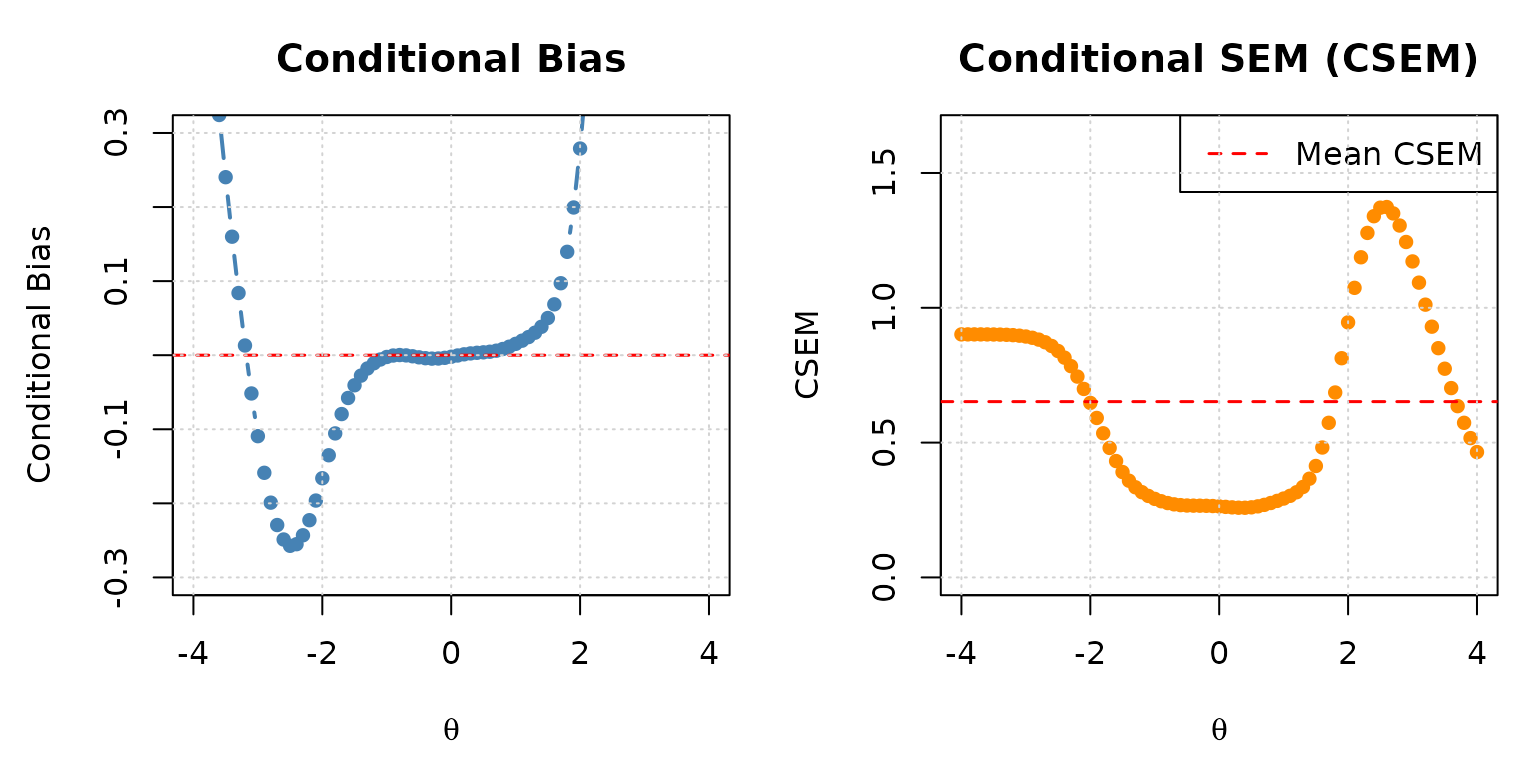
Conditional bias (left) and CSEM (right) for the simMST 1-3-3 panel across the ability scale.
You can also create a combined ggplot2 figure, as shown
in the reval_mst() help page:
library(ggplot2)
library(tidyr)
library(dplyr)

eval_tb %>%
  dplyr::select(theta, bias, csem) %>%
  tidyr::pivot_longer(
    cols      = c(bias, csem),
    names_to  = "criterion",
    values_to = "value"
  ) %>%
  ggplot2::ggplot(aes(x = theta, y = value)) +
  ggplot2::geom_hline(yintercept = 0, linetype = "dashed", colour = "grey50") +
  ggplot2::geom_line(aes(colour = criterion, linetype = criterion), linewidth = 1.2) +
  ggplot2::geom_point(aes(shape = criterion), size = 2.5) +
  ggplot2::scale_colour_manual(values = c(bias = "steelblue", csem = "darkorange")) +
  ggplot2::scale_linetype_manual(values = c(bias = "solid", csem = "dashed")) +
  ggplot2::labs(
    x       = expression(theta),
    y       = NULL,
    title   = "1-3-3 MST Panel: Conditional Bias and CSEM",
    colour  = NULL,
    linetype = NULL,
    shape   = NULL
  ) +
  ggplot2::theme_bw() +
  ggplot2::theme(legend.key.width = unit(1.5, "cm"))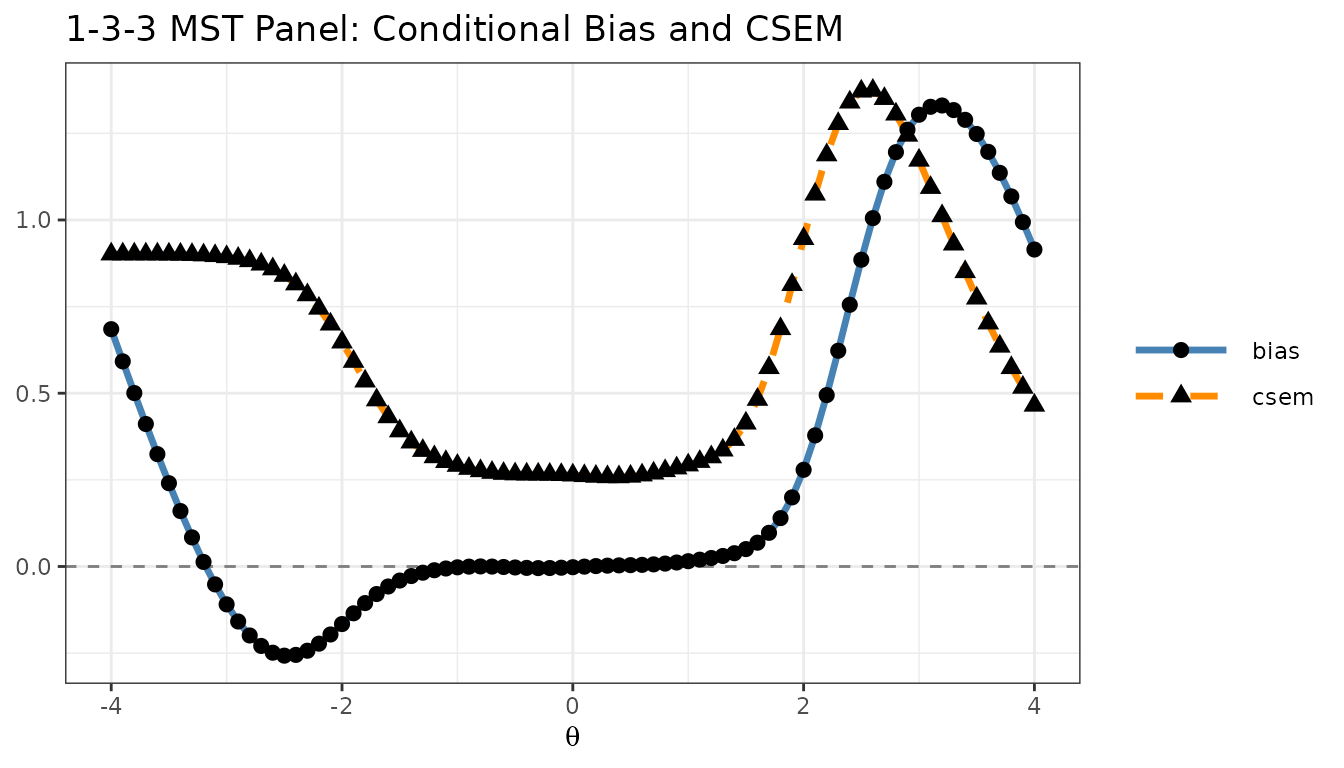
Bias and CSEM plotted together using ggplot2.
Example 3: Exploring Other Output Components
Beyond eval.tb, reval_mst() returns
intermediate objects that can help diagnose how the panel operates.
Panel Structure (panel.info)
# Panel configuration: which modules belong to each stage
eval_result$panel.info$config
#> $stage.1
#> [1] 1
#>
#> $stage.2
#> [1] 2 3 4
#>
#> $stage.3
#> [1] 5 6 7

# All valid pathways through the panel
eval_result$panel.info$pathway
#>        stage.1 stage.2 stage.3
#> path.1       1       2       5
#> path.2       1       2       6
#> path.3       1       3       5
#> path.4       1       3       6
#> path.5       1       3       7
#> path.6       1       4       6
#> path.7       1       4       7

# Number of modules per stage
eval_result$panel.info$n.module
#> stage.1 stage.2 stage.3
#>       1       3       3

# Total number of stages
eval_result$panel.info$n.stage
#> [1] 3
Items per Module (item.by.mod)
# Item metadata for Module 1 (the routing module)
eval_result$item.by.mod$m.1
#>   id cats model    par.1       par.2      par.3
#> 1  4    2  3PLM 1.221246  1.53688842 0.07581786
#> 2 18    2  3PLM 1.622737  0.06477017 0.05118737
#> 3 19    2  3PLM 1.336215  1.40423576 0.04806838
#> 4 20    2  3PLM 1.629243 -1.55679267 0.08627866
#> 5 29    2  3PLM 2.083387 -0.72116319 0.06071835
#> 6 40    2  3PLM 1.423525 -1.51207055 0.09036353
#> 7 47    2  3PLM 1.749734  0.81776913 0.06977780
#> 8 51    2  3PLM 1.559166 -0.03225149 0.08974932
# Item metadata for Module 5 (Stage 3, first terminal module)
eval_result$item.by.mod$m.5
#>   id cats model     par.1      par.2      par.3
#> 1  6    2  3PLM 1.3195904 -0.8294680 0.05324622
#> 2 14    2  3PLM 1.0655003 -0.7298034 0.07826248
#> 3 16    2  3PLM 1.4237437 -1.6356798 0.06386124
#> 4 21    2  3PLM 1.4501399 -0.5532830 0.15345051
#> 5 26    2  3PLM 1.3768223 -0.7683207 0.11185801
#> 6 28    2  3PLM 1.2187965  1.9922146 0.06489523
#> 7 30    2  3PLM 1.3802801 -0.3492380 0.11699158
#> 8 45    2  3PLM 0.9269771 -1.5949464 0.09669537
Inverse-TCC Ability Estimates (eq.theta)
The eq.theta component contains the IRT
estimates corresponding to each possible observed sum score, computed
via the inverse TCC method. These are the
score-to-
mappings used for routing and final ability reporting.
# eq.theta[[stage]][, path] gives a vector of theta estimates,
# one per possible sum score on that partial pathway

# Stage 1, Path 1 (routing module only, 8 items, scores 0-8)
cat("Theta estimates for Stage 1 (8 items, scores 0-8):\n")
#> Theta estimates for Stage 1 (8 items, scores 0-8):
round(eval_result$eq.theta$stage.1[, 1], 3)
#> [1] -7.000 -2.013 -1.249 -0.676 -0.150  0.373  0.913  1.534  7.000
# Stage 3 has multiple columns, one per complete pathway
cat("Dimensions of eq.theta at Stage 3 (rows = possible scores, cols = pathways):\n")
#> Dimensions of eq.theta at Stage 3 (rows = possible scores, cols = pathways):
dim(eval_result$eq.theta$stage.3)
#> [1] 25  7
Each element of eq.theta is a matrix for one stage. The
number of rows equals the number of possible cumulative sum scores (0
through maximum score) up to that stage, and each column corresponds to
one partial pathway up to that stage; at the last stage, the columns are
the complete pathways.
Inspecting Test Information by Pathway
Comparing item information across pathways reveals why bias and CSEM vary with ability level:
# Retrieve item metadata for the easiest and hardest complete pathways
# (pathway 1 = low ability; last pathway = high ability)
n_paths <- nrow(eval_result$panel.info$pathway)

meta_low  <- eval_result$item.by.path$stage.3$path.1          # low-ability path
meta_high <- eval_result$item.by.path[[3]][[n_paths]]          # high-ability path

theta_grid <- seq(-4, 4, 0.1)

tif_low  <- info(x = meta_low,  theta = theta_grid, D = 1.702)$tif
tif_high <- info(x = meta_high, theta = theta_grid, D = 1.702)$tif

par(mfrow = c(1, 1), mar = c(4.5, 4.5, 3, 1))
plot(
  theta_grid, tif_low,
  type = "l", col = "steelblue", lwd = 2,
  xlab = expression(theta), ylab = "Test Information",
  main = "Test Information: Low-Ability vs. High-Ability Pathway",
  ylim = c(0, max(c(tif_low, tif_high)) * 1.1)
)
lines(theta_grid, tif_high, col = "darkorange", lwd = 2, lty = 2)
legend(
  "topright",
  legend  = c("Low-ability pathway (path 1)", "High-ability pathway (last path)"),
  col     = c("steelblue", "darkorange"),
  lty     = c(1, 2), lwd = 2
)
grid()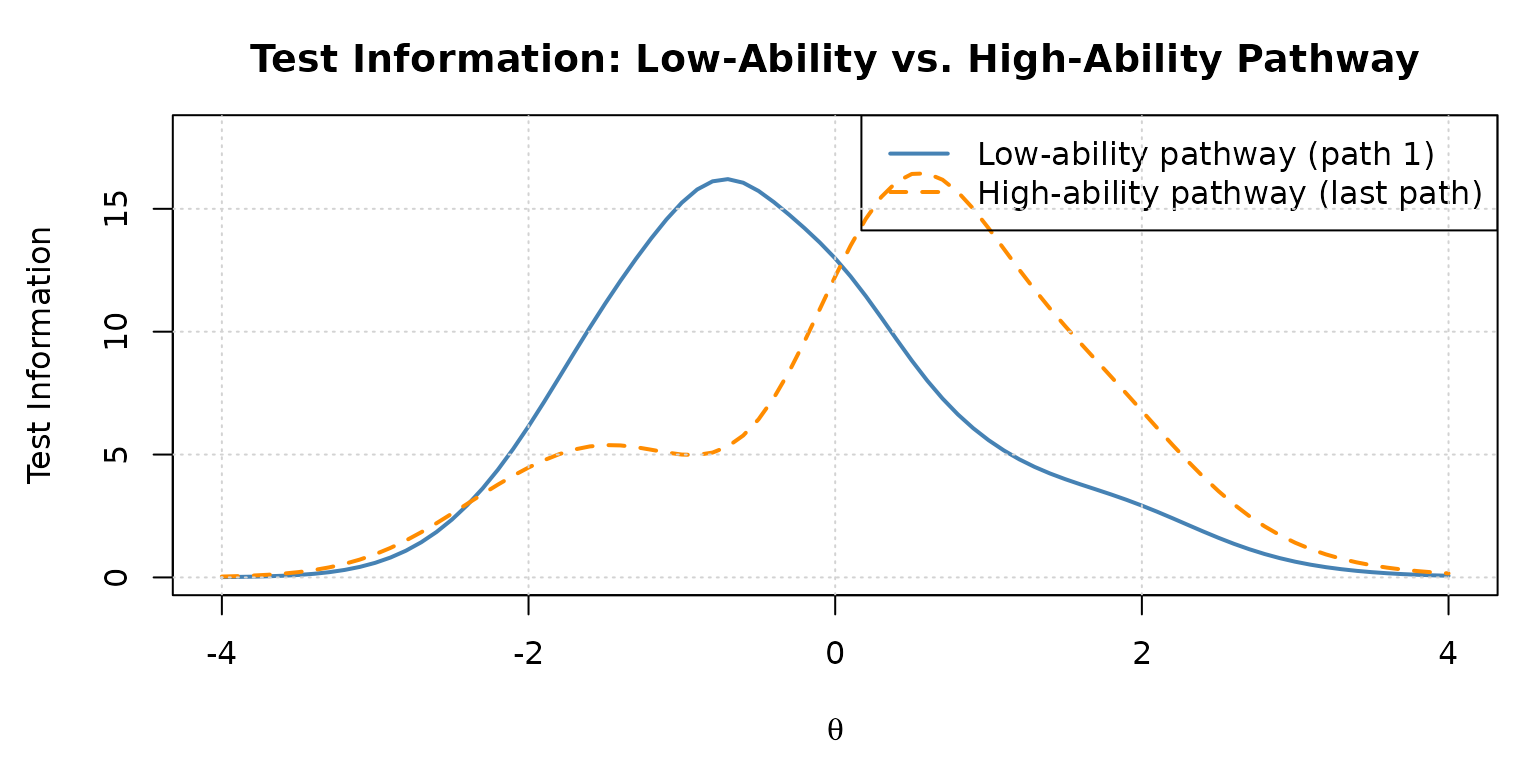
Test information functions for two contrasting pathways in the 1-3-3 panel.
The low-ability pathway peaks at negative values, while the high-ability pathway peaks at positive values, exactly what good MST design achieves.
Example 4: Building a Custom MST Panel
To evaluate a panel design from scratch, you need to construct
x, module, route_map, and
cut_score yourself. This example shows how to do this for a
1-2-2 MST panel with 5 modules and 6 items per module
(30 items total).
Design Overview
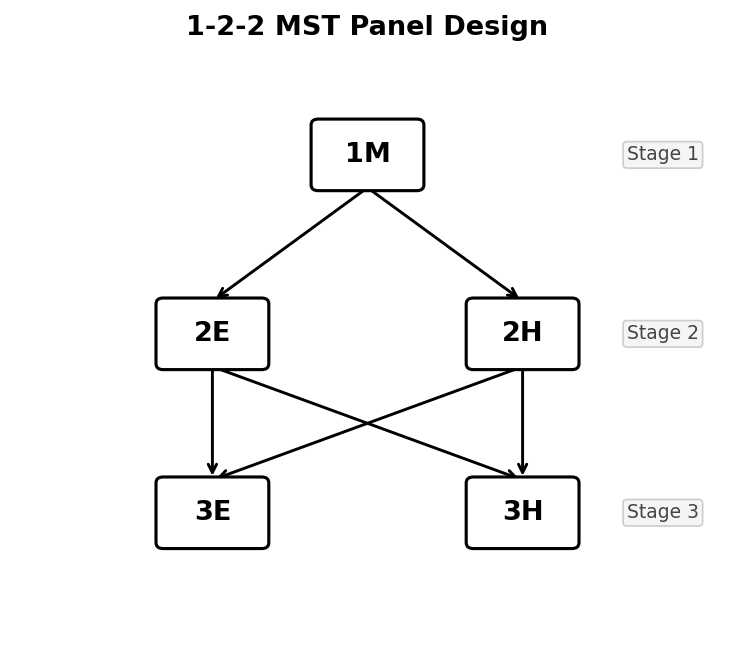
1-2-2 MST panel design. From Stage 1, all examinees begin at module 1M. After Stage 1, they are routed to either 2E (easy) or 2H (hard). After Stage 2, they can be routed to either 3E or 3H regardless of which Stage 2 module they took.
Routing:
- Stage 1 → Stage 2: → M2 (Easy), → M3 (Hard)
- Stage 2 → Stage 3: → M4 (Easy), → M5 (Hard)
This gives 4 pathways: M1-M2-M4, M1-M2-M5, M1-M3-M4, M1-M3-M5.
Step 1: Build the Item Bank
Items in easy modules have lower difficulty; items in hard modules have higher difficulty. We use the 3PLM for all items.
# 6 items per module × 5 modules = 30 items total
n_per_mod <- 6

# Helper: create item metadata for one module
make_mod_items <- function(a_mean, b_vec, g_val, id_prefix) {
  shape_df(
    par.drm  = list(
      a = rep(a_mean, n_per_mod),
      b = b_vec,
      g = rep(g_val, n_per_mod)
    ),
    item.id  = paste0(id_prefix, 1:n_per_mod),
    cats     = 2,
    model    = "3PLM"
  )
}

# Module 1 (Routing, Stage 1): moderate difficulty
items_m1 <- make_mod_items(
  a_mean   = 1.2,
  b_vec    = c(-0.5, -0.2,  0.0,  0.2,  0.4,  0.6),
  g_val    = 0.15,
  id_prefix = "M1_I"
)

# Module 2 (Easy, Stage 2): lower difficulty
items_m2 <- make_mod_items(
  a_mean   = 1.1,
  b_vec    = c(-2.0, -1.6, -1.3, -1.0, -0.7, -0.4),
  g_val    = 0.15,
  id_prefix = "M2_I"
)

# Module 3 (Hard, Stage 2): higher difficulty
items_m3 <- make_mod_items(
  a_mean   = 1.3,
  b_vec    = c( 0.4,  0.6,  0.9,  1.2,  1.5,  1.8),
  g_val    = 0.15,
  id_prefix = "M3_I"
)

# Module 4 (Easy, Stage 3): lowest difficulty
items_m4 <- make_mod_items(
  a_mean   = 1.0,
  b_vec    = c(-2.5, -2.2, -1.9, -1.6, -1.3, -1.0),
  g_val    = 0.15,
  id_prefix = "M4_I"
)

# Module 5 (Hard, Stage 3): highest difficulty
items_m5 <- make_mod_items(
  a_mean   = 1.4,
  b_vec    = c( 0.8,  1.1,  1.4,  1.7,  2.0,  2.3),
  g_val    = 0.15,
  id_prefix = "M5_I"
)

# Combine into single item bank
item_bank_122 <- dplyr::bind_rows(items_m1, items_m2, items_m3, items_m4, items_m5)
cat("Item bank dimensions:", nrow(item_bank_122), "items x", ncol(item_bank_122), "columns\n")
#> Item bank dimensions: 30 items x 6 columns
print(item_bank_122)
#>       id cats model par.1 par.2 par.3
#> 1  M1_I1    2  3PLM   1.2  -0.5  0.15
#> 2  M1_I2    2  3PLM   1.2  -0.2  0.15
#> 3  M1_I3    2  3PLM   1.2   0.0  0.15
#> 4  M1_I4    2  3PLM   1.2   0.2  0.15
#> 5  M1_I5    2  3PLM   1.2   0.4  0.15
#> 6  M1_I6    2  3PLM   1.2   0.6  0.15
#> 7  M2_I1    2  3PLM   1.1  -2.0  0.15
#> 8  M2_I2    2  3PLM   1.1  -1.6  0.15
#> 9  M2_I3    2  3PLM   1.1  -1.3  0.15
#> 10 M2_I4    2  3PLM   1.1  -1.0  0.15
#> 11 M2_I5    2  3PLM   1.1  -0.7  0.15
#> 12 M2_I6    2  3PLM   1.1  -0.4  0.15
#> 13 M3_I1    2  3PLM   1.3   0.4  0.15
#> 14 M3_I2    2  3PLM   1.3   0.6  0.15
#> 15 M3_I3    2  3PLM   1.3   0.9  0.15
#> 16 M3_I4    2  3PLM   1.3   1.2  0.15
#> 17 M3_I5    2  3PLM   1.3   1.5  0.15
#> 18 M3_I6    2  3PLM   1.3   1.8  0.15
#> 19 M4_I1    2  3PLM   1.0  -2.5  0.15
#> 20 M4_I2    2  3PLM   1.0  -2.2  0.15
#> 21 M4_I3    2  3PLM   1.0  -1.9  0.15
#> 22 M4_I4    2  3PLM   1.0  -1.6  0.15
#> 23 M4_I5    2  3PLM   1.0  -1.3  0.15
#> 24 M4_I6    2  3PLM   1.0  -1.0  0.15
#> 25 M5_I1    2  3PLM   1.4   0.8  0.15
#> 26 M5_I2    2  3PLM   1.4   1.1  0.15
#> 27 M5_I3    2  3PLM   1.4   1.4  0.15
#> 28 M5_I4    2  3PLM   1.4   1.7  0.15
#> 29 M5_I5    2  3PLM   1.4   2.0  0.15
#> 30 M5_I6    2  3PLM   1.4   2.3  0.15
Step 2: Build the Module Matrix
The module matrix has the same number of rows as
item_bank_122 and one column per module. Each row has
exactly one 1, in the column for the module that item belongs to.
n_mods  <- 5
n_items <- nrow(item_bank_122)   # 30

module_122 <- matrix(0L, nrow = n_items, ncol = n_mods)
colnames(module_122) <- paste0("M", 1:n_mods)

# Items 1-6 → M1, items 7-12 → M2, ..., items 25-30 → M5
for (m in 1:n_mods) {
  idx <- ((m - 1) * n_per_mod + 1):(m * n_per_mod)
  module_122[idx, m] <- 1L
}

# Verify: each row sums to 1, each column sums to n_per_mod
cat("Row sums (all should be 1):\n"); print(table(rowSums(module_122)))
#> Row sums (all should be 1):
#>
#>  1
#> 30
cat("Column sums (all should be", n_per_mod, "):\n"); print(colSums(module_122))
#> Column sums (all should be 6 ):
#> M1 M2 M3 M4 M5
#>  6  6  6  6  6
Step 3: Build the Route Map
route_map_122 <- matrix(0L, nrow = n_mods, ncol = n_mods)
rownames(route_map_122) <- colnames(route_map_122) <- paste0("M", 1:n_mods)

# Stage 1 → Stage 2
route_map_122[1, 2] <- 1L   # M1 → M2 (low ability)
route_map_122[1, 3] <- 1L   # M1 → M3 (high ability)

# Stage 2 → Stage 3 (both M2 and M3 can route to either M4 or M5)
route_map_122[2, 4] <- 1L   # M2 → M4
route_map_122[2, 5] <- 1L   # M2 → M5
route_map_122[3, 4] <- 1L   # M3 → M4
route_map_122[3, 5] <- 1L   # M3 → M5

print(route_map_122)
#>    M1 M2 M3 M4 M5
#> M1  0  1  1  0  0
#> M2  0  0  0  1  1
#> M3  0  0  0  1  1
#> M4  0  0  0  0  0
#> M5  0  0  0  0  0
Step 5: Evaluate the Custom Panel
# Evaluation grid: -3 to 3 in steps of 0.5 (coarser for speed)
theta_grid_122 <- seq(-3, 3, 0.5)

eval_122 <- reval_mst(
  x         = item_bank_122,
  D         = 1.702,
  route_map = route_map_122,
  module    = module_122,
  cut_score = cut_score_122,
  theta     = theta_grid_122,
  range.tcc = c(-5, 5)
)

# Evaluation table
print(eval_122$eval.tb)
#>    theta          mu    sigma2         bias      csem
#> 1   -3.0 -3.19623125 0.8592354 -0.196231249 0.9269495
#> 2   -2.5 -2.72861584 0.7871656 -0.228615843 0.8872235
#> 3   -2.0 -2.11902994 0.5155952 -0.119029937 0.7180496
#> 4   -1.5 -1.52846765 0.2785520 -0.028467654 0.5277803
#> 5   -1.0 -0.99289282 0.2024505  0.007107183 0.4499450
#> 6   -0.5 -0.47947559 0.1729555  0.020524412 0.4158792
#> 7    0.0 -0.01380778 0.1486202 -0.013807784 0.3855129
#> 8    0.5  0.46107384 0.1534703 -0.038926159 0.3917529
#> 9    1.0  0.99556805 0.1267071 -0.004431952 0.3559594
#> 10   1.5  1.52787128 0.1395430  0.027871283 0.3735546
#> 11   2.0  2.15212965 0.5041920  0.152129651 0.7100648
#> 12   2.5  3.12555584 1.5165325  0.625555842 1.2314757
#> 13   3.0  4.12958178 1.4429566  1.129581775 1.2012313
eval_tb_122 <- eval_122$eval.tb

par(mfrow = c(1, 2), mar = c(4.5, 4.5, 3, 1))

plot(
  eval_tb_122$theta, eval_tb_122$bias,
  type = "b", pch = 16, col = "steelblue", lwd = 2,
  xlab = expression(theta), ylab = "Conditional Bias",
  main = "1-2-2 Panel: Conditional Bias",
  ylim = range(c(-0.4, 0.4, eval_tb_122$bias))
)
abline(h = 0, col = "red", lty = 2, lwd = 1.5)
grid()

plot(
  eval_tb_122$theta, eval_tb_122$csem,
  type = "b", pch = 16, col = "darkorange", lwd = 2,
  xlab = expression(theta), ylab = "CSEM",
  main = "1-2-2 Panel: CSEM",
  ylim = c(0, max(eval_tb_122$csem) * 1.2)
)
grid()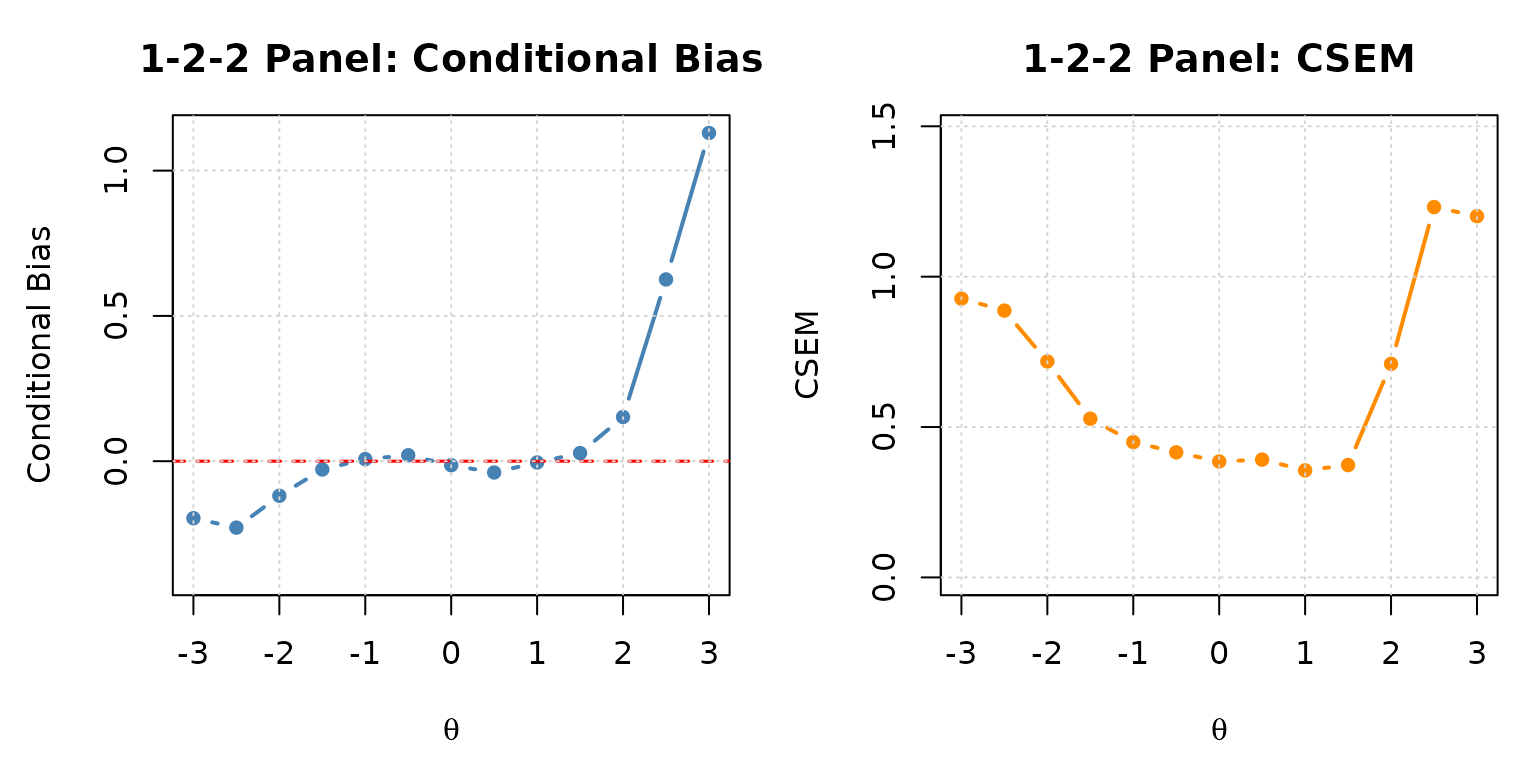
Conditional bias and CSEM for the custom 1-2-2 MST panel.
Step 6: Inspect the Panel Pathways
# Confirmed pathways through the 1-2-2 panel
eval_122$panel.info$pathway
#>        stage.1 stage.2 stage.3
#> path.1       1       2       4
#> path.2       1       2       5
#> path.3       1       3       4
#> path.4       1       3       5
The 1-2-2 panel has 4 pathways, considerably fewer than the 1-3-3 panel’s 7 pathways. The simpler branching structure is appropriate for smaller-scale tests or when fewer stage-3 difficulty levels are needed.
Example 5: Comparing Two Cut Score Configurations
Cut score placement directly affects measurement bias. Placing cuts
too close to the centre can cause mid-ability examinees to be routed
sub-optimally. Here we compare the simMST cut scores (about
-0.45 and 0.45) with a wider configuration c(-1.0, 1.0) for
the 1-3-3 panel.
# Alternative cut scores: wider routing bands
cut_score_wide <- list(c(-1.0, 1.0), c(-1.0, 1.0))

eval_wide <- reval_mst(
  x         = x,
  D         = 1.702,
  route_map = route_map,
  module    = module,
  cut_score = cut_score_wide,
  theta     = theta,
  range.tcc = c(-7, 7)
)
tb_orig <- eval_result$eval.tb
tb_wide <- eval_wide$eval.tb

par(mfrow = c(1, 2), mar = c(4.5, 4.5, 3, 1))

# Bias comparison
ylim_bias <- range(c(tb_orig$bias, tb_wide$bias, -0.4, 0.4))
plot(
  tb_orig$theta, tb_orig$bias,
  type = "b", pch = 16, col = "steelblue", lwd = 2,
  xlab = expression(theta), ylab = "Conditional Bias",
  main = "Bias Comparison", ylim = ylim_bias
)
lines(tb_wide$theta, tb_wide$bias,
      type = "b", pch = 17, col = "darkorange", lwd = 2, lty = 2)
abline(h = 0, col = "grey50", lty = 3)
legend("topright",
       legend = c("simMST cuts (about -0.45 and 0.45)", "Wider cuts (-1.0 and 1.0)"),
       col    = c("steelblue", "darkorange"),
       pch    = c(16, 17), lty = c(1, 2), lwd = 2, cex = 0.85)
grid()

# CSEM comparison
ylim_csem <- c(0, max(c(tb_orig$csem, tb_wide$csem)) * 1.2)
plot(
  tb_orig$theta, tb_orig$csem,
  type = "b", pch = 16, col = "steelblue", lwd = 2,
  xlab = expression(theta), ylab = "CSEM",
  main = "CSEM Comparison", ylim = ylim_csem
)
lines(tb_wide$theta, tb_wide$csem,
      type = "b", pch = 17, col = "darkorange", lwd = 2, lty = 2)
legend("topright",
       legend = c("simMST cuts (about -0.45 and 0.45)", "Wider cuts (-1.0 and 1.0)"),
       col    = c("steelblue", "darkorange"),
       pch    = c(16, 17), lty = c(1, 2), lwd = 2, cex = 0.85)
grid()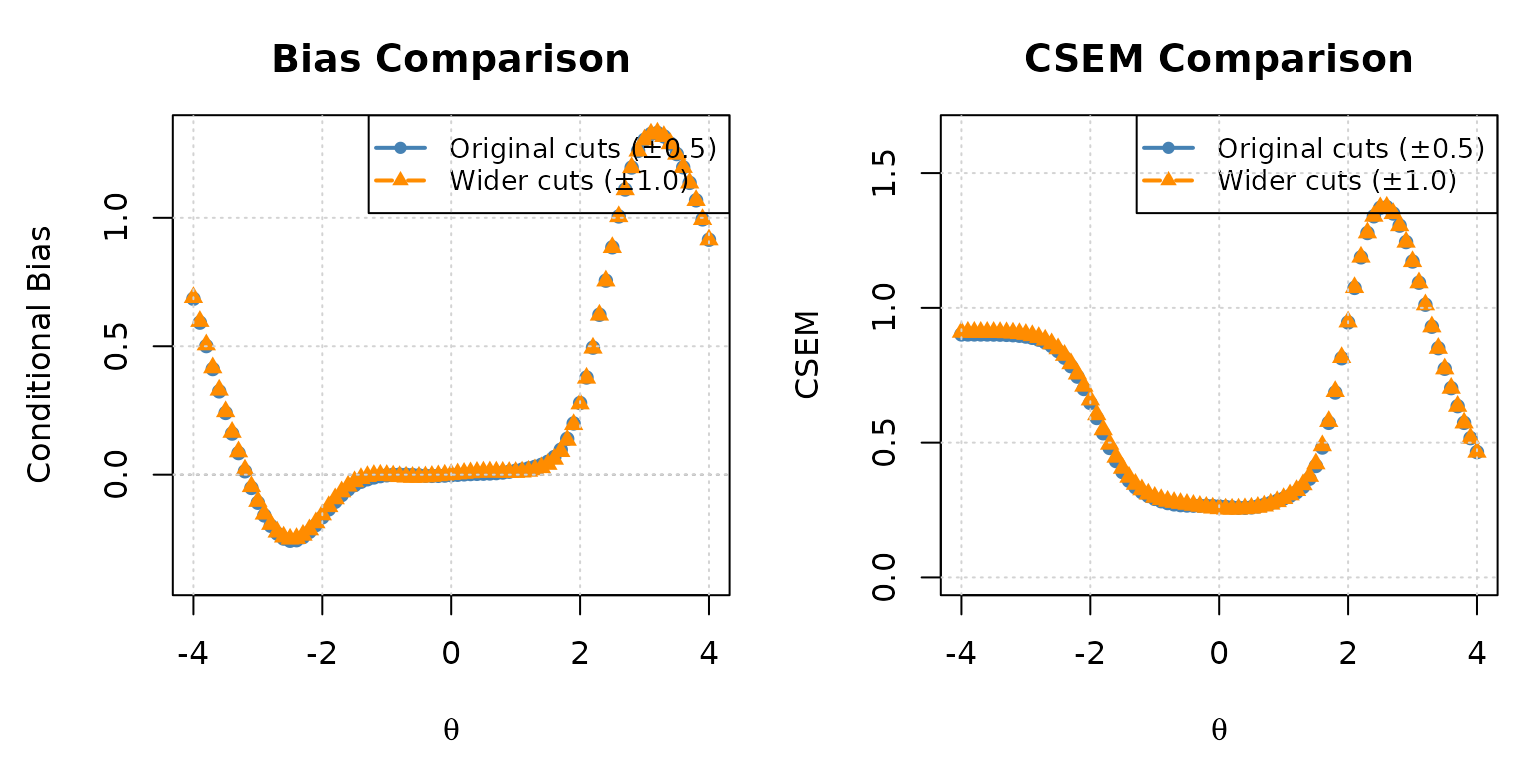
CSEM comparison: simMST vs. wider cut scores in the 1-3-3 panel.
# Largest absolute differences between the two configurations
max(abs(tb_wide$bias - tb_orig$bias))
#> [1] 0.02474664
max(abs(tb_wide$csem - tb_orig$csem))
#> [1] 0.01745606
For this panel, the two configurations give almost the same conditional bias and CSEM: the largest difference is about 0.02 for both, and the large biases at the ability extremes are the same. Wider cuts send more examinees to the middle modules of Stages 2 and 3, so the module paths differ, but the effect on the final precision is small here.
Example 6: Validating reval_mst() Against a
run_mst() Monte Carlo Simulation
The “Why Simulate MST Panel Performance?” section introduced
run_mst() and noted that turning a single simulation run
into a full panel evaluation means looping it over a
grid with many replications per point, the traditional Monte Carlo
approach. Lim et al. (2021) validated
their recursion-based analytical method against exactly this kind of
simulation, and the closeness of the agreement they found depended on
the scoring method used. When the simulation used the same scoring as
the recursion throughout, the simulated and analytical results matched
closely at every
and converged further as replications increased. That scoring was
equated-number-correct (ENC) scoring, a deterministic
score-to-
transformation analogous to the inverse-TCC scoring inside
reval_mst(). When the simulation instead used a combination
more common in practice (EAP for routing and MLE for the final score),
the two methods still agreed closely in the central ability range, but
diverged toward the extremes, where the item pool carries little
information and MLE behaves quite differently from the inverse-TCC-based
recursion. That region of close central agreement widens as test length
increases.
We reproduce the scoring combination of that second condition here
for the simMST panel (EAP for routing and ML for the final
score): route_score = list(method = "EAP") for routing at
each interim stage, and final_score = list(method = "ML")
for the reported final score. Unlike Lim et al.
(2021), whose simulations routed examinees with the maximum
information rule, the simulation below routes with the panel’s fixed cut
scores, the routing rule that reval_mst() assumes. Neither
scoring method matches reval_mst()’s internal inverse-TCC
logic, so the two results are not expected to coincide everywhere; the
comparison below should show the same
central-agreement-with-tail-divergence pattern Lim et al. (2021) reported.
Because the exact values stored in simMST$theta are not
needed for this comparison, we define our own explicit evaluation grid
so that the Monte Carlo simulation and the analytical computation are
guaranteed to line up point-for-point:
# An explicit, independent evaluation grid
theta_grid <- seq(-5, 5, 0.5)
n_reps     <- 300   # simulated examinees per grid point

# Repeat each grid point n_reps times into one long vector of true abilities
set.seed(2026)
true_theta <- rep(theta_grid, each = n_reps)
Step 1: Monte Carlo simulation with
run_mst(). All n_reps replications at
every grid point are simulated in a single call by passing the full
true_theta vector. Routing uses the panel’s fixed cut
scores (matching the routing rule reval_mst() assumes),
with EAP routing scores and ML final scores,
the scoring combination of Lim et al.
(2021):
sim_mc <- run_mst(
  x            = x,
  route_map    = route_map,
  module       = module,
  theta        = true_theta,
  D            = 1.702,
  route_method = NULL,
  cut_score    = cut_score,
  route_score  = list(method = "EAP", norm.prior = c(0, 1), nquad = 41),
  final_score  = list(method = "ML", range = c(-4, 4)),
  se           = FALSE,
  verbose      = FALSE
)

# Empirical bias and RMSE at each grid point
mc_tb <- data.frame(theta = true_theta, est.theta = sim_mc$est.theta)
diff_mc  <- mc_tb$est.theta - mc_tb$theta
bias_mc  <- tapply(diff_mc, mc_tb$theta, mean)
rmse_mc  <- tapply(diff_mc, mc_tb$theta, function(d) sqrt(mean(d^2)))

mc_result <- data.frame(
  theta = as.numeric(names(bias_mc)),
  bias  = as.numeric(bias_mc),
  rmse  = as.numeric(rmse_mc)
)
mc_result <- mc_result[order(mc_result$theta), ]
Step 2: Analytical computation with
reval_mst() on the same
theta_grid, so the comparison is point-for-point:
eval_grid <- reval_mst(
  x         = x,
  D         = 1.702,
  route_map = route_map,
  module    = module,
  cut_score = cut_score,
  theta     = theta_grid,
  range.tcc = c(-7, 7)
)

tb_grid      <- eval_grid$eval.tb
tb_grid$rmse <- sqrt(tb_grid$sigma2 + tb_grid$bias^2)
Step 3: Overlay the two results:
par(mfrow = c(1, 2), mar = c(4.5, 4.5, 3, 1))

# Bias: Monte Carlo (points) vs. analytical (line)
plot(
  tb_grid$theta, tb_grid$bias,
  type = "l", lwd = 2, col = "steelblue",
  xlab = expression(theta), ylab = "Bias", main = "Bias: Simulation vs. Analytical",
  ylim = range(c(tb_grid$bias, mc_result$bias, -0.3, 0.3))
)
points(mc_result$theta, mc_result$bias, pch = 16, col = "darkorange")
abline(h = 0, col = "grey50", lty = 3)
legend("topright",
       legend = c("reval_mst() (analytical)", "run_mst() (Monte Carlo)"),
       col = c("steelblue", "darkorange"), lty = c(1, NA), pch = c(NA, 16),
       lwd = c(2, NA), cex = 0.8)
grid()

# RMSE: Monte Carlo (points) vs. analytical (line)
plot(
  tb_grid$theta, tb_grid$rmse,
  type = "l", lwd = 2, col = "steelblue",
  xlab = expression(theta), ylab = "RMSE", main = "RMSE: Simulation vs. Analytical",
  ylim = c(0, max(c(tb_grid$rmse, mc_result$rmse)) * 1.2)
)
points(mc_result$theta, mc_result$rmse, pch = 16, col = "darkorange")
legend("topright",
       legend = c("reval_mst() (analytical)", "run_mst() (Monte Carlo)"),
       col = c("steelblue", "darkorange"), lty = c(1, NA), pch = c(NA, 16),
       lwd = c(2, NA), cex = 0.8)
grid()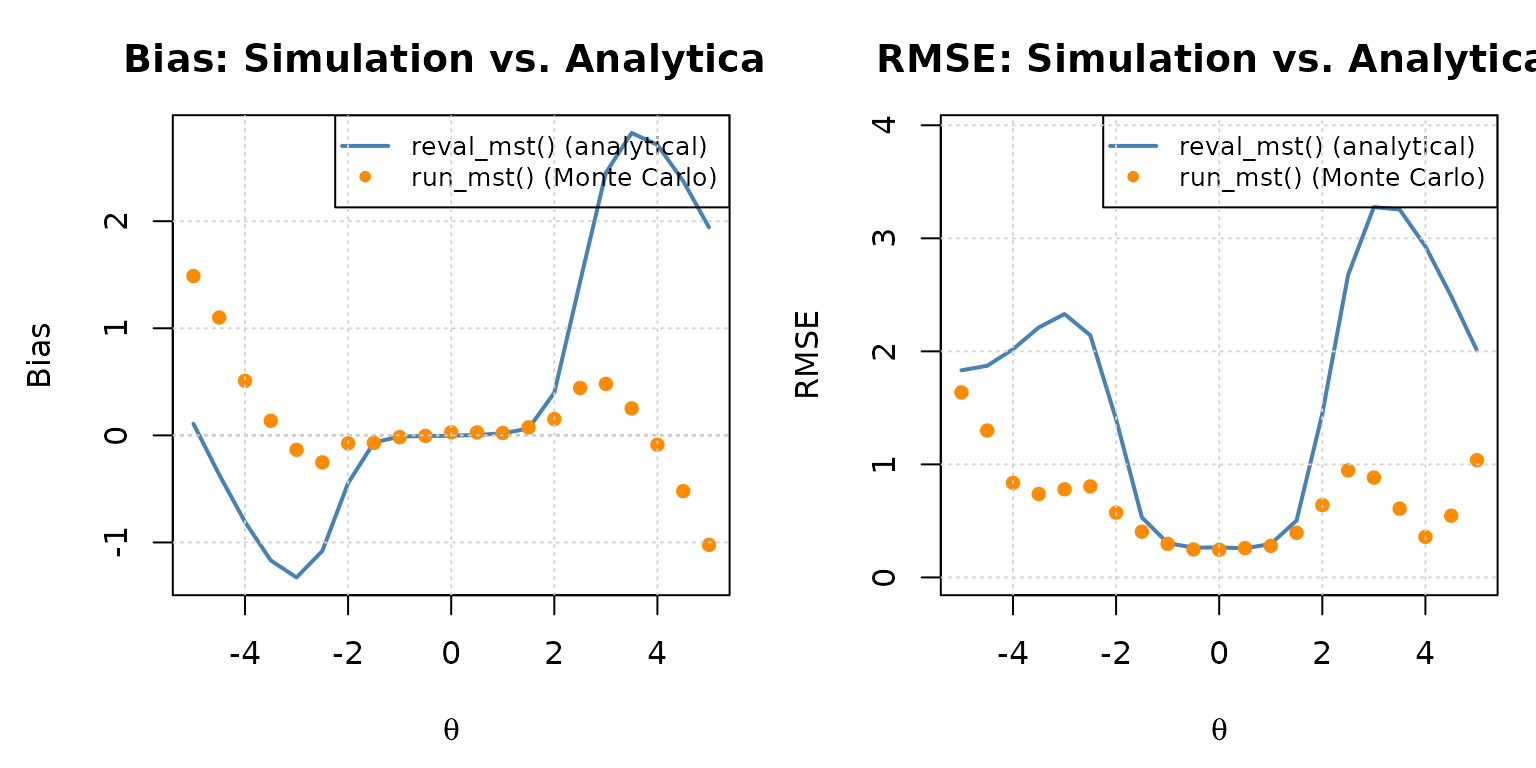
Empirical bias and RMSE from a run_mst() Monte Carlo simulation (points) overlaid on the analytical reval_mst() curve (line).
In the central ability range (which Lim et al.
(2021) reported as roughly
for this scoring combination, widening for longer tests), the Monte
Carlo points should track the analytical curve closely, with the small
remaining deviations attributable to sampling error at
n_reps = 300 replications per grid point (these shrink
further as n_reps increases). Toward the extremes, the two
are expected to diverge: both EAP routing and
ML final scoring depart from reval_mst()’s
internal inverse-TCC logic, and that departure grows where the item pool
carries little information and EAP/MLE estimates behave quite
differently from the inverse-TCC-based recursion. This mirrors the
pattern Lim et al. (2021) reported for the
same EAP-routing and MLE-final scoring combination. Matching the
recursion’s own scoring exactly
(route_score = list(method = "INV.TCC") and
final_score = list(method = "INV.TCC") instead of the EAP
and ML methods) would close most of this gap. reval_mst()
is therefore best read as predicting the performance of a panel routed
and scored via inverse-TCC; whenever a program uses a different scoring
approach operationally, a run_mst() simulation like this
one remains the more direct check, particularly for ability levels far
from the panel’s region of peak information.
Step 4: Confirm the gap closes under matched
scoring. As a final check, re-run the same simulation with
route_score = list(method = "INV.TCC") and
final_score = list(method = "INV.TCC"), matching
reval_mst()’s internal logic exactly:
sim_mc_matched <- run_mst(
  x            = x,
  route_map    = route_map,
  module       = module,
  theta        = true_theta,
  D            = 1.702,
  route_method = NULL,
  cut_score    = cut_score,
  route_score  = list(method = "INV.TCC", range.tcc = c(-7, 7)),
  final_score  = list(method = "INV.TCC", range.tcc = c(-7, 7)),
  se           = FALSE,
  verbose      = FALSE
)

# Empirical bias and RMSE at each grid point, matched-scoring condition
diff_matched <- sim_mc_matched$est.theta - true_theta
bias_matched <- tapply(diff_matched, true_theta, mean)
rmse_matched <- tapply(diff_matched, true_theta, function(d) sqrt(mean(d^2)))

mc_result_matched <- data.frame(
  theta = as.numeric(names(bias_matched)),
  bias  = as.numeric(bias_matched),
  rmse  = as.numeric(rmse_matched)
)
mc_result_matched <- mc_result_matched[order(mc_result_matched$theta), ]
Comparing all three at the tail grid points, where the
EAP/ML condition diverged most from the
analytical curve:
compare_tb <- data.frame(
  theta              = theta_grid,
  analytical_bias    = round(tb_grid$bias, 3),
  EAP_ML_bias        = round(mc_result$bias, 3),
  INVTCC_INVTCC_bias = round(mc_result_matched$bias, 3),
  analytical_rmse    = round(tb_grid$rmse, 3),
  EAP_ML_rmse        = round(mc_result$rmse, 3),
  INVTCC_INVTCC_rmse = round(mc_result_matched$rmse, 3)
)
compare_tb[compare_tb$theta <= -3 | compare_tb$theta >= 3, ]
#>    theta analytical_bias EAP_ML_bias INVTCC_INVTCC_bias analytical_rmse
#> 1   -5.0           0.108       1.483             -0.017           1.833
#> 2   -4.5          -0.367       1.090             -0.472           1.872
#> 3   -4.0          -0.808       0.503             -0.783           2.019
#> 4   -3.5          -1.168       0.130             -1.160           2.211
#> 5   -3.0          -1.327      -0.138             -1.254           2.330
#> 17   3.0           2.452       0.481              2.494           3.277
#> 18   3.5           2.824       0.252              2.819           3.254
#> 19   4.0           2.713      -0.088              2.741           2.929
#> 20   4.5           2.375      -0.521              2.410           2.488
#> 21   5.0           1.942      -1.023              1.955           2.007
#>    EAP_ML_rmse INVTCC_INVTCC_rmse
#> 1        1.632              1.785
#> 2        1.291              1.868
#> 3        0.833              2.022
#> 4        0.740              2.181
#> 5        0.782              2.262
#> 17       0.883              3.302
#> 18       0.608              3.252
#> 19       0.359              2.938
#> 20       0.546              2.491
#> 21       1.037              2.006
The same comparison, overlaid across the full ability range:
par(mfrow = c(1, 2), mar = c(4.5, 4.5, 3, 1))

# Bias: matched-scoring Monte Carlo (points) vs. analytical (line)
plot(
  tb_grid$theta, tb_grid$bias,
  type = "l", lwd = 2, col = "steelblue",
  xlab = expression(theta), ylab = "Bias",
  main = "Bias: Simulation vs. Analytical",
  ylim = range(c(tb_grid$bias, mc_result_matched$bias, -0.3, 0.3))
)
points(mc_result_matched$theta, mc_result_matched$bias, pch = 16, col = "forestgreen")
abline(h = 0, col = "grey50", lty = 3)
legend("topright",
       legend = c("reval_mst() (analytical)", "run_mst() (INV.TCC/INV.TCC)"),
       col = c("steelblue", "forestgreen"), lty = c(1, NA), pch = c(NA, 16),
       lwd = c(2, NA), cex = 0.8)
grid()

# RMSE: matched-scoring Monte Carlo (points) vs. analytical (line)
plot(
  tb_grid$theta, tb_grid$rmse,
  type = "l", lwd = 2, col = "steelblue",
  xlab = expression(theta), ylab = "RMSE",
  main = "RMSE: Simulation vs. Analytical",
  ylim = c(0, max(c(tb_grid$rmse, mc_result_matched$rmse)) * 1.2)
)
points(mc_result_matched$theta, mc_result_matched$rmse, pch = 16, col = "forestgreen")
legend("topright",
       legend = c("reval_mst() (analytical)", "run_mst() (INV.TCC/INV.TCC)"),
       col = c("steelblue", "forestgreen"), lty = c(1, NA), pch = c(NA, 16),
       lwd = c(2, NA), cex = 0.8)
grid()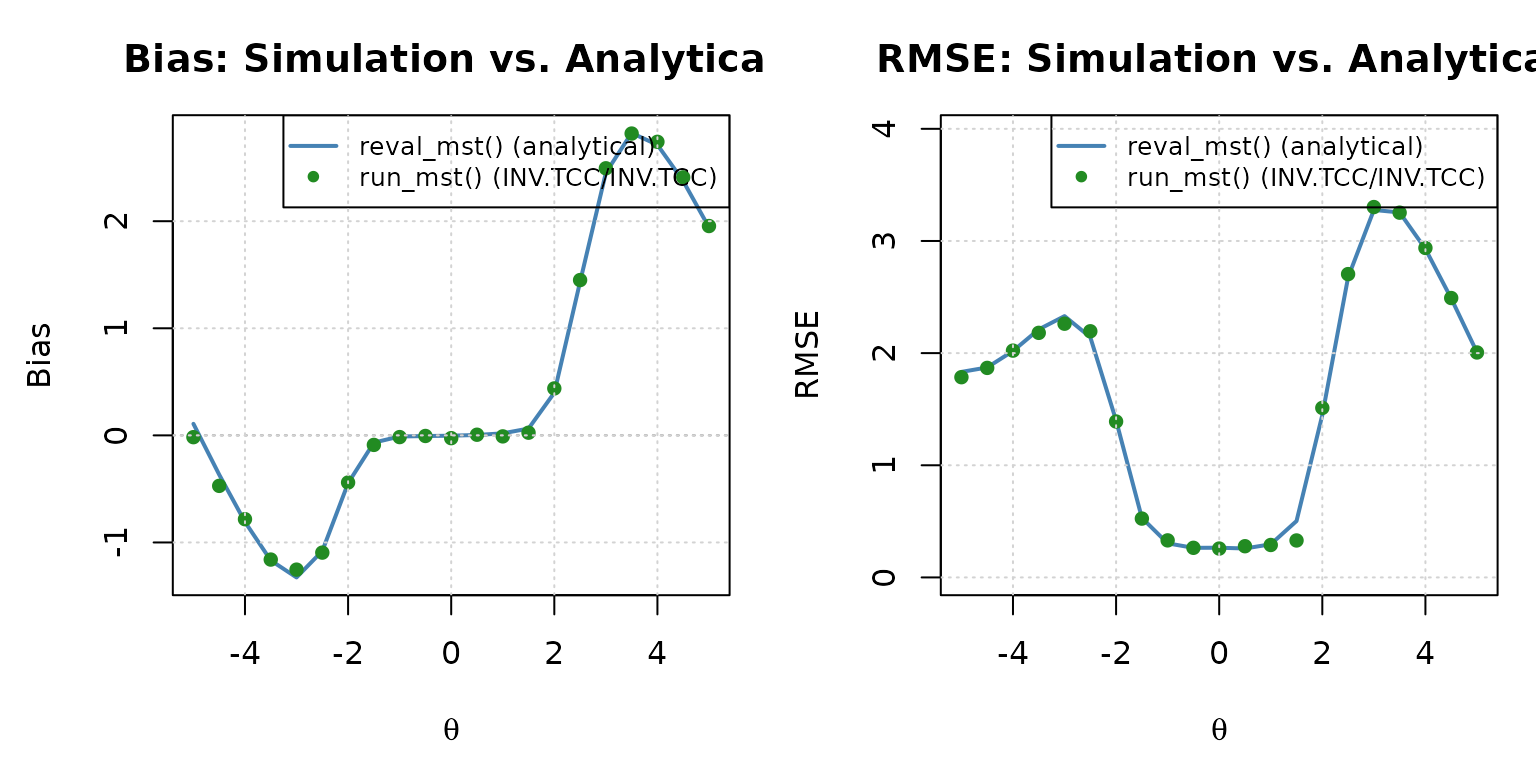
Empirical bias and RMSE from the INV.TCC/INV.TCC run_mst() Monte Carlo simulation (points) overlaid on the analytical reval_mst() curve (line).
Both the table and the plot confirm the same conclusion: the
INV.TCC/INV.TCC condition tracks the
analytical bias and RMSE closely across the entire ability
range, including the extremes where the EAP/ML
condition diverged.
Function Reference
reval_mst() Arguments
| Argument | Type | Default | Description |
|---|---|---|---|
x |
data.frame | - | Item bank metadata (irtQ format) |
D |
numeric | 1 | Scaling constant (use 1.702 for normal-ogive approximation) |
route_map |
matrix | - | Binary square matrix of module transitions |
module |
matrix | - | Binary matrix mapping items to modules |
cut_score |
list | - | List of routing cut score vectors (one per stage transition) |
theta |
numeric | seq(-5, 5, 1) |
Ability grid for evaluation |
intpol |
logical | TRUE | Linear interpolation for out-of-range TCC scores |
range.tcc |
numeric(2) | c(-7, 7) |
Ability estimates assigned to the lowest and the maximum sum scores
when intpol = TRUE
|
tol |
numeric | 1e-4 | Convergence tolerance for bisection in inverse TCC |
reval_mst() Return Value
| Component | Description |
|---|---|
panel.info |
Panel structure: $config, $pathway,
$n.module, $n.stage
|
item.by.mod |
List of item metadata data frames, one per module |
item.by.path |
List of cumulative item metadata per stage and pathway |
eq.theta |
Inverse-TCC estimates for each possible score, by stage and pathway |
cdist.by.mod |
Conditional score distributions per module, indexed by |
jdist.by.path |
Joint conditional score distributions, indexed by and stage |
eval.tb |
Evaluation table: theta, mu,
sigma2, bias, csem
|
run_mst() Arguments
| Argument | Type | Default | Description |
|---|---|---|---|
x |
data.frame | - | Item bank metadata (irtQ format) |
route_map |
matrix | - | Binary square matrix of module transitions |
module |
matrix | - | Binary matrix mapping items to modules |
theta |
numeric | NULL |
True ability for each simulated examinee (or supply
response instead) |
response |
matrix | NULL |
Pre-generated response matrix, used instead of simulating from
theta
|
D |
numeric | 1 | Scaling constant (use 1.702 for normal-ogive approximation) |
ini_mod |
integer | NULL |
Fixed Stage-1 module for all examinees; NULL assigns
each independently at random |
route_method |
character | "bmat" |
"bmat", "mfi", or NULL for
fixed cut-score routing |
cut_score |
list | NULL |
List of routing cut score vectors; used only when
route_method = NULL
|
route_score |
list | ML (see ?run_mst) |
Scoring method used at intermediate stages (ML,
WL, MLF, MAP, EAP,
EAP.SUM, INV.TCC, …) |
final_score |
list | ML (see ?run_mst) |
Scoring method used for the final reported score |
se |
logical | TRUE |
Whether to compute standard errors of the final score |
missing |
scalar | NA |
Value marking a missing response in response
|
verbose |
logical | TRUE |
Whether to print simulation progress messages to the console |
return_full_resp |
logical | FALSE |
If TRUE, also returns the full N x J
item-level response matrix as full.resp
|
run_mst() Return Value
| Component | Description |
|---|---|
call |
The matched function call |
est.theta |
Final ability estimate for each simulated examinee |
se.theta |
Standard error of the final ability estimate |
theta.route |
Cumulative ability estimate used for routing after each stage (from all modules taken so far); the last column is the final estimate |
path |
Module pathway taken by each examinee |
true.theta |
The theta argument (true abilities), or
NULL if theta was not supplied |
panel |
Panel structure information (from panel_info()) |
D |
The scaling constant used |
route.method |
The route_method argument |
route.score |
The route_score list with all defaults filled in |
final.score |
The final_score list with all defaults filled in |
N |
Number of examinees |
full.resp |
Full item-level response matrix if
return_full_resp = TRUE, otherwise NULL
|